Lot
- Available on
- Trial
- Pro
- Enterprise
- Who can do this
- Open a lot's pageRoles: Administrator, Employee
Permission: inventory:read - Quarantine a lot or release itRoles: Administrator
Permission: inventory:quarantine - See where a lot went, on its pageRoles: Administrator, Employee
Permission: order:read - See where a lot came from, on its pageRoles: Administrator, Employee
Permission: purchasing:read
- Open a lot's pageRoles: Administrator, Employee
A lot is one batch of an item tracked by lot, such as one delivery of fresh yeast with the supplier’s lot number on its label. werkplan keeps each lot’s stock apart, so you know which batch is where, and its status says whether the batch can be used.
You open a lot from the Lots screen, or from a lot number on a stock movement, a balance or a stocktake line.
Where lots come from
Section titled “Where lots come from”A material is tracked by lot when it is Lot-tracked: see Material. A product you make can be tracked by lot too. Every receipt of such an item names a lot:
- a delivery against a purchase order asks for the Lot number on the label and the day it Expires;
- Receive stock on the Stock screen asks for the Lot number, and the Manufacture date and Expiration date if you know them;
- the opening stock import names each row’s lot;
- what a production order makes of a product tracked by lot goes into a lot named after the production order.
A lot number is the item’s own: the same number received again adds to that lot. A receipt that gives the lot other dates than it has is refused; one that gives a date the lot lacks fills it in.
What its page shows
Section titled “What its page shows”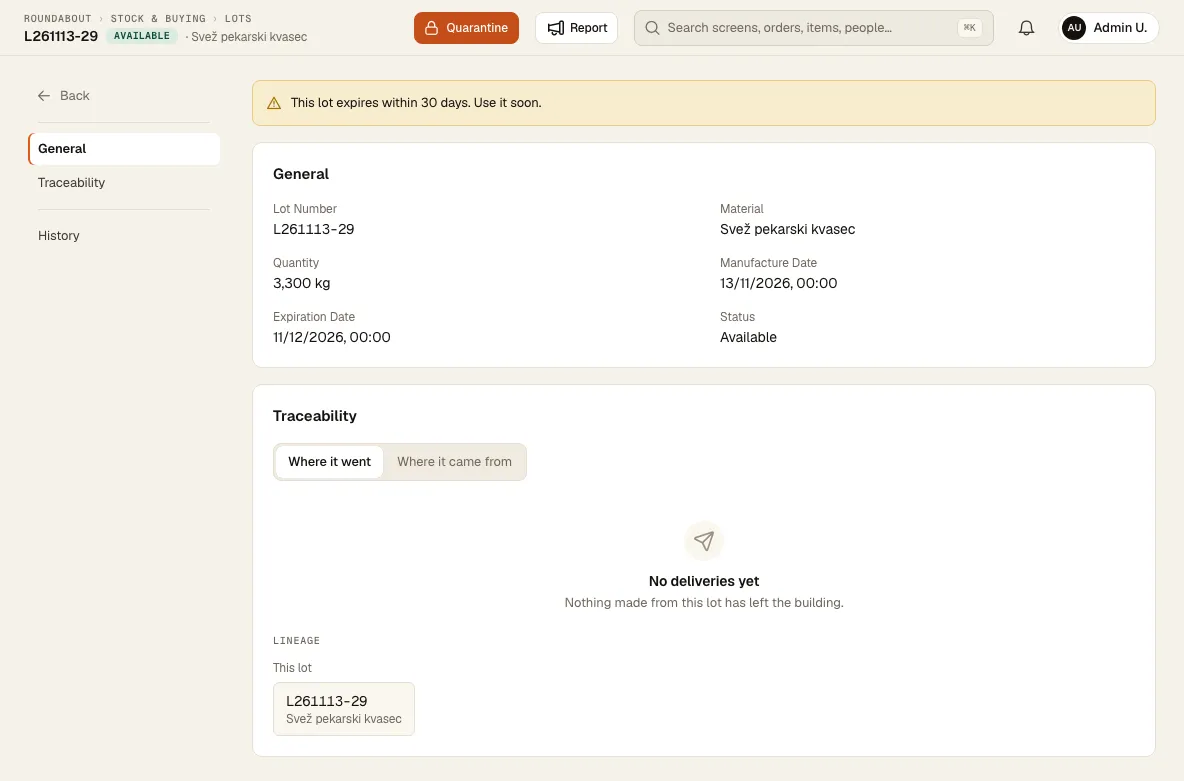
- The top bar: the lot number, its material and its status. Quarantine on an available lot and Release on a quarantined one, for people with
inventory:quarantine. - A notice when the lot has passed its expiration date, and one when it expires within 30 days.
- General: the Lot Number, Material, the Quantity on hand, the Manufacture Date, the Expiration Date and the Status.
- Traceability: Where it went, the deliveries to customers of this lot and of what was made from it, for people with
order:read; Where it came from, the purchase orders and receipts that brought it in, for people withpurchasing:read. When units of the lot were made into something not tracked by lot, a notice says how many can’t be traced further. - Notes: the reasons it was quarantined, and each release.
- History: who created it and who changed it last, and when.
Statuses
Section titled “Statuses”werkplan works out Expired and Depleted by itself; quarantining and releasing are decisions.
stateDiagram-v2
  accTitle: Lot statuses
  accDescr: A lot is created Available. Quarantine holds it back and Release makes it available again. The nightly check marks an available lot past its expiration date Expired. An available lot whose stock runs out is Depleted, and available again when stock comes back.
  [*] --> Available: Received
  Available --> Quarantine: Quarantine
  Quarantine --> Available: Release
  Available --> Expired: Past its expiration date
  Available --> Depleted: Stock runs out
  Depleted --> Available: Stock comes back
| Status | How a lot gets it | How it leaves it | Can be issued and reserved |
|---|---|---|---|
| Available | Received; released; stock back in a depleted lot | Quarantine; its expiration date passes; its stock runs out | Yes, until its expiration date |
| Quarantine | Quarantine, from Available only | Release | No |
| Expired | The nightly check, once its expiration date has passed | It stays expired | No |
| Depleted | Its stock on hand runs out | Stock comes back into it | Nothing to issue |
Quarantining and releasing need the permission inventory:quarantine, which by default only the Administrator role holds.
Available
Section titled “Available”The lot can be used: it is issued, reserved, delivered and moved, counts in On hand on the Stock screen, and counts as free stock for planning. It is usable up to and including its expiration date; from the day after, werkplan refuses to issue or reserve it, even before the nightly check marks it Expired. Expiration dates count in your organisation’s time zone.
Quarantine
Section titled “Quarantine”The lot is held back, for example while QA checks it. You quarantine it with Quarantine and a Reason, which werkplan adds to its notes. From then on:
- nothing can issue, reserve, deliver or ship it on a transfer;
- every reservation on it is released at once; the next promote reserves usable stock in its place;
- the Stock screen leaves it out of On hand, and Balances marks its stock not usable;
- planning doesn’t count it as free stock, so a production order that needed it can wait for material.
The stock is still on the shelf: a stocktake counts it, and an adjustment can write it off. Release makes the lot Available again; it reserves nothing by itself. A quarantined lot stays quarantined when its stock runs out.
Expired
Section titled “Expired”The lot’s expiration date has passed. Each night werkplan marks every available lot past its date Expired and releases the reservations on it, and on every quarantined lot too. An expired lot is treated as quarantined: nothing can issue, reserve or deliver it, it is out of On hand, and planning doesn’t count it. It stays expired: write its stock off with an adjustment when you throw it away. See Correct stock on hand.
Depleted
Section titled “Depleted”The lot’s stock on hand has run out: it was all issued, delivered or written off. Nothing of it is left to use. When stock comes back into it, such as a receipt of the same lot number or a voided issue, it is Available again.
Still stuck? Write to support@example.com.