Operator
- Available on
- Trial
- Pro
- Enterprise
- Who can do this
- See the operatorsRoles: Administrator
Permission: operator:read - Add an operator, change one, reset a PIN, deactivate or reactivate oneRoles: Administrator
Permission: operator:write - Link an operator to an employee, beside operator:writeRoles: Administrator, Shift supervisor, Employee
Permission: employee:read - Sign in as an operator at a terminalRoles: Administrator, Shop floor terminal, Warehouse terminal
Permission: shopfloor:operate
- See the operatorsRoles: Administrator
An operator is a person who signs in at a shop-floor terminal: they tap their name and type their PIN. The PIN doesn’t let anyone into werkplan, as the terminal has signed in with an account of its own; it says who is standing at the terminal, so every job started, every count and every receipt recorded there carries their name.
You keep operators on the Operators screen. An operator is not a user account, and may be linked to the employee they are.
What it holds
Section titled “What it holds”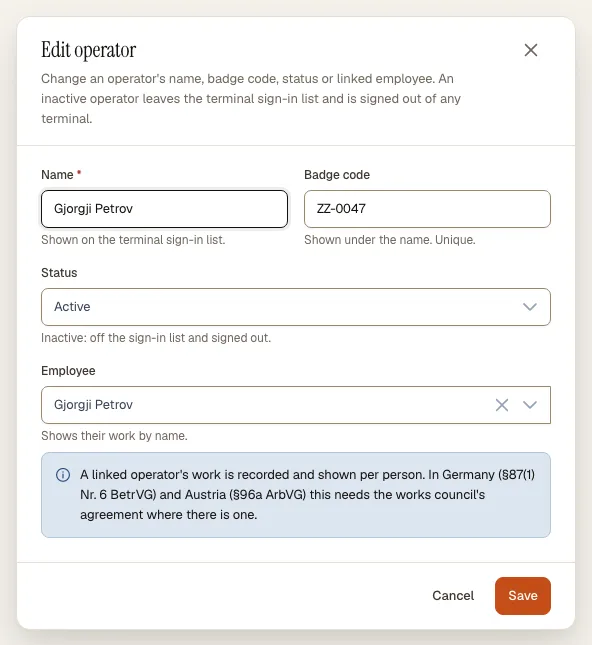
- Name: what the terminal’s sign-in list shows. It doesn’t follow the employee’s name, nor the employee’s it.
- Badge code: shown under the name on the terminal; unique among your operators.
- PIN: 4 digits, set when you add the operator and changed with Reset PIN. werkplan keeps it scrambled and never shows it.
- Status: Active or Inactive.
- Employee: the employee they are, or none.
- Whether five wrong PINs locked them out, and when they last signed in.
Signing in
Section titled “Signing in”At the terminal, the operator taps their name and types their PIN on the keypad, which goes on at the fourth digit. A wrong PIN reads That PIN was not recognised. Try again., the same whether the PIN, the person or their status is wrong. Five wrong PINs in a row lock that operator out for 15 minutes, and after that each wrong PIN locks them out again, until they type the right one; Reset PIN ends a lockout at once.
They stay signed in until they tap their name and Sign out, or until 30 minutes pass without them recording anything, and for 12 hours at most. Once the sign-in has ended, the terminal’s next call to werkplan brings the PIN pad back over the screen, and what they had typed is still there: within half a minute on Jobs, which reads its list every 30 seconds, and at the next tap on the other screens. One operator is signed in at a terminal at a time: signing in signs out whoever was signed in there. Reloading the page asks for the PIN again.
Statuses
Section titled “Statuses”stateDiagram-v2 accTitle: Operator statuses accDescr: An operator is created active. Deactivate operator, or the status Inactive, makes them inactive; anonymising their employee does too. Reactivate operator, or the status Active, makes them active again. [*] --> Active: Create operator Active --> Inactive: Deactivate operator Active --> Inactive: Their employee is anonymised Inactive --> Active: Reactivate operator
| Status | How an operator gets it | How they leave it | Elsewhere |
|---|---|---|---|
| Active | Create operator, or Reactivate operator | Deactivate operator, or their employee is anonymised | On every terminal’s sign-in list |
| Inactive | Deactivate operator, the Status set to Inactive, or their employee anonymised | Reactivate operator, or the Status set to Active | Off the sign-in list; signed out of any terminal |
Moving an operator between the two needs operator:write.
Active
Section titled “Active”The operator is on the sign-in list of every terminal and can sign in with their PIN. Every operator is active when you add them. Nothing is planned on an operator, and nobody is told of a change: the plan names employees, which a linked operator is.
Inactive
Section titled “Inactive”The operator has left the terminals: they are off the sign-in list, and a terminal they are signed in at signs them out at its next call to werkplan. The jobs, counts, receipts and pick lists they recorded keep their name. Use it for someone who has left; werkplan deletes no operator.
Anonymising an employee makes their operator inactive too: the operator takes the employee’s anonymised name, and loses their badge code and their PIN. werkplan refuses to make such an operator active again without a PIN, and the screen gives a PIN only to an active operator, so they stay inactive.
Still stuck? Write to support@example.com.