Price lists
- Available on
- Trial
- Pro
- Enterprise
- Who can do this
- Open this screenRoles: Administrator, Employee
Permission: customer:read - Price an item on a list, change or remove its price, and add or remove a customerRoles: Administrator
Permission: customer:write
- Open this screenRoles: Administrator, Employee
The Price lists screen lists the sets of prices particular customers pay instead of an item’s own sales price. Here you price items on a list and choose the customers it applies to.
A price list prices the quote and sales order lines you add for its customers, while it is in force. Lines already entered keep their prices: changing a list never changes a quote or a sales order.
The list
Section titled “The list”The list shows each price list’s Name, its State, when it is In force and when it was Created; its card says how many customers it Applies to. Show it as Cards or as a Table, search it, and filter it by Name, State and Created.
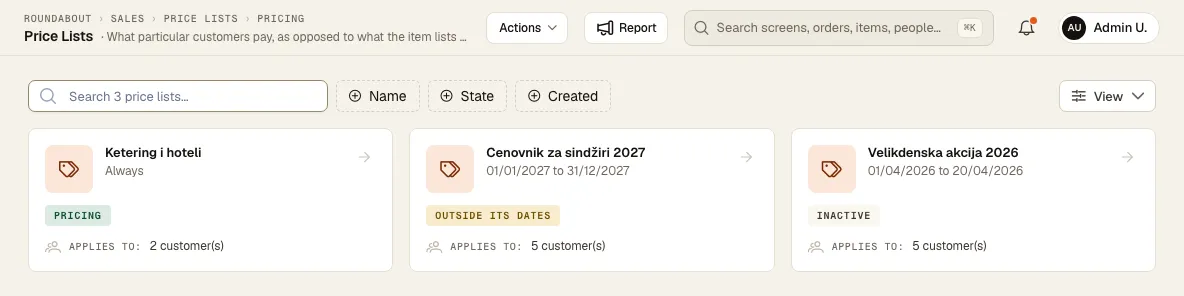
State reads:
- Pricing: the list is active and today falls within its dates, so it prices its customers’ lines.
- Outside its dates: the list is active, but today is before its first day or after its last, so it prices nothing today.
- Inactive: the list is switched off and prices nothing.
In force gives its dates, such as From a day or Until a day; Always for a list with no dates. A list’s first and last day both count.
werkplan’s screens don’t make a price list, rename it, change its dates or its status, or delete it: ask your werkplan contact. Click a list to open its page: see Price list.
How werkplan prices a line
Section titled “How werkplan prices a line”When you add a line to a quote or a sales order, werkplan prices it from the customer and the item, and writes the price and discount onto the line:
- Among the customer’s price lists that are pricing today, the lowest price any of them gives the item wins, with no discount on top: a list price already holds the customer’s deal.
- With none, the line takes the item’s own sales price, set on its page, and the customer’s standing discount.
- With neither, the line is left unpriced. An unpriced line reads Not priced and adds nothing to the totals; it isn’t free.
A Unit price or Discount % you type on the line wins over what werkplan finds. Accepting a quote copies its lines’ prices onto the sales order as they are, and resolves nothing again.
Prices are in your organisation’s currency, set on the Organization screen. werkplan never converts them.
Still stuck? Write to support@example.com.