Production sequence
- Available on
- Trial
- Pro
- Enterprise
- Who can do this
- Open this screenRoles: Administrator
Permission: order:write - Move an orderRoles: Administrator
Permission: order:write
- Open this screenRoles: Administrator
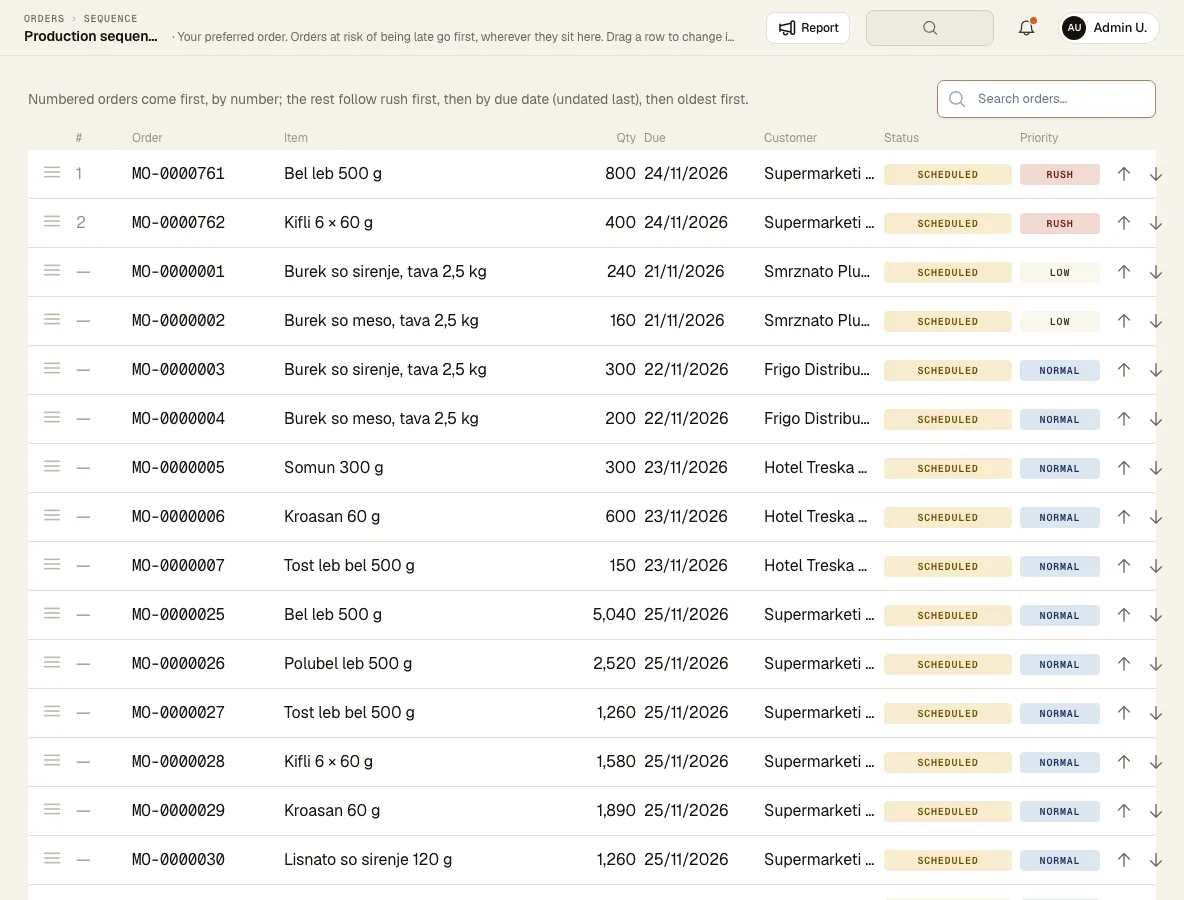
The Production sequence screen holds your preferred order for every production order not completed or cancelled. werkplan’s planner follows it where nothing more important asks otherwise: orders at risk of being late go first, wherever they sit here.
You also reach it from Sequence under Actions on the Production orders screen.
The list
Section titled “The list”Each row shows the order’s place (#), the Order, its Item, Qty, Due date, Customer, Status and Priority. Drafts and orders on hold are on the list too. Search it with Search orders….
Orders you have placed come first, by their number. The rest follow: rush orders first, then by due date, undated last, then oldest first. A production order made Rush takes a place among the numbered orders: above the first that isn’t rush, or is rush and due later, else after the last.
Move an order
Section titled “Move an order”Drag a row by its handle, or move it with its up and down arrows. Each move is saved at once; there is no Save. If werkplan refuses a move, the row goes back where it was.
What the sequence changes
Section titled “What the sequence changes”The sequence is a preference, not a rule. werkplan’s planner places work, keeps rush orders on time and keeps orders as little late as it can before it follows the sequence: see How werkplan’s planner decides. An order low on the list goes first when placing it later would make it late.
A scenario reads the sequence when you create it, and the re-plan when it is opened. Moving an order doesn’t change the master plan in force: the scenario or re-plan you promote after the move plans with it.
Still stuck? Write to support@example.com.