Machine
- Available on
- Trialup to 25 machines
- Proup to 150 machines
- Enterprise
- Who can do this
- Open a machine's pageRoles: Administrator, Employee
Permission: equipment:read - Change it, its status, capacities, changeovers and training, and add or change its unavailable timeRoles: Administrator
Permission: equipment:write - Delete it, or remove a capacity, a training requirement or an unavailable time, or clear its default capacityRoles: Administrator
Permission: equipment:delete - Report it down, or back, on the Report pageRoles: Administrator, Shift supervisor
Permission: exception:report
- Open a machine's pageRoles: Administrator, Employee
A machine is one piece of equipment of an equipment type, such as Oven 2 of the type Oven. Its status says whether werkplan plans work on it: an Operational machine is planned, a Decommissioned one isn’t, and one that is Out of Service is out of use for a while.
You open a machine from the Equipment screen, from its equipment type’s page, or from Show changes on the Master plan screen.
What its page shows
Section titled “What its page shows”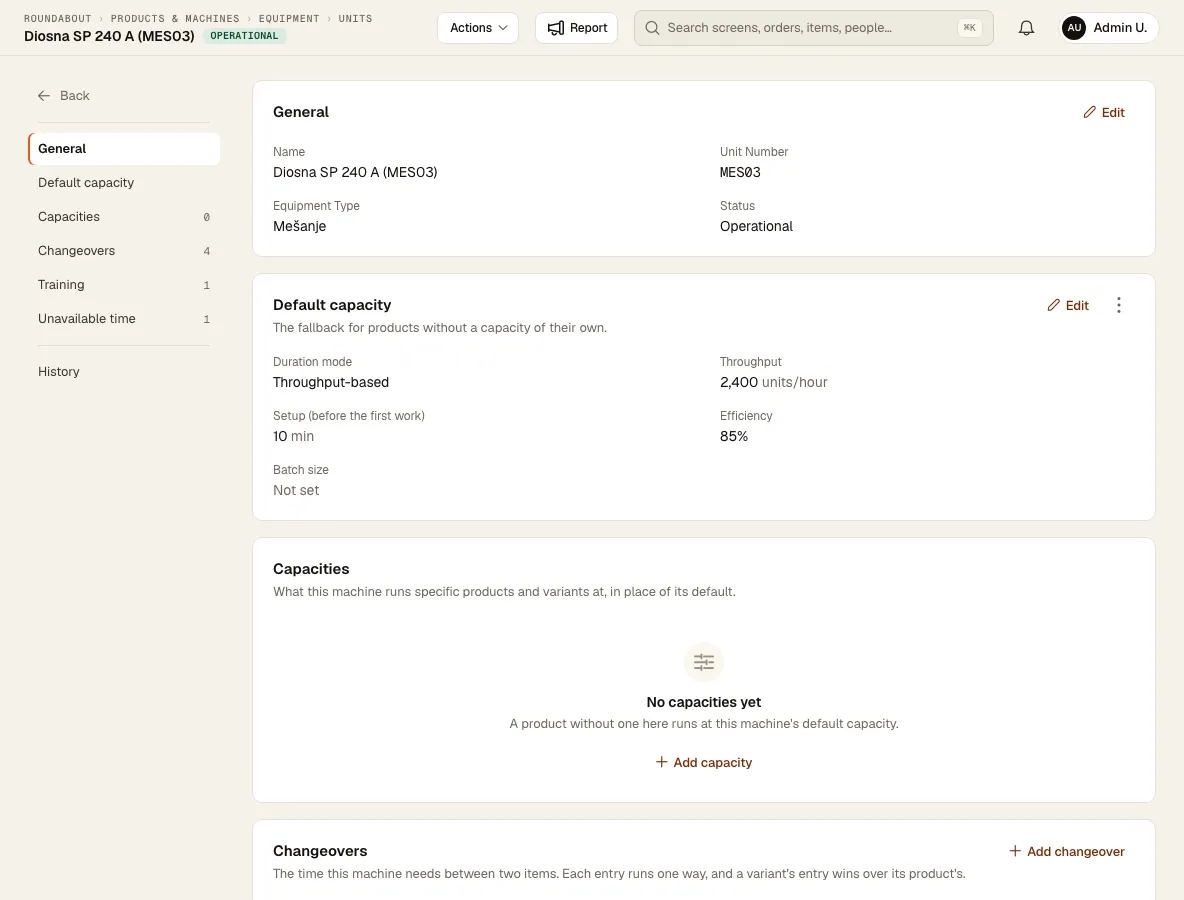
- General: its Name, Unit Number, Equipment Type and Status. Edit changes them, and its cost per hour and its changeover.
- Default capacity: how it runs any product without a capacity of its own here.
- Capacities: how it runs particular products and variants, in place of the default.
- Changeovers: the time it needs between two items.
- Training: the trainings it takes to run it, and how many employees with each.
- Unavailable time: the periods it is out of use.
- History: who created the machine and who changed it last, and when.
Actions holds Duplicate, which copies the machine with its capacities, changeovers and training but not its unavailable time, and Delete.
How werkplan plans with it
Section titled “How werkplan plans with it”Capacities
Section titled “Capacities”A capacity says how the machine runs an item. Without one for the item, or a default one, the machine can’t run it, and an order nothing can run is left out of the plan with No machine can run it.
- Processing time: Time per batch, the same minutes at any batch size, or Rate per hour, units made in an hour, so a bigger batch takes longer. A routing step with a time of its own uses its own instead.
- Setup (before the first work): minutes before this machine’s first work in a production schedule.
- Efficiency (%): at 80 %, each batch takes 1.25 times as long on this machine.
- Minimum batch and Maximum batch: the batch sizes it takes. An order is split into batches that fit.
- Capacity unit: the unit its batches and rate count in, such as kg, converted for each variant through its attributes. Empty, they count in the item’s base unit.
Add capacity, under Capacities, chooses an active Product and, if you like, one Variant: left empty, it covers every variant. A variant’s capacity wins over its product’s, and the product’s over the default.
Changeovers
Section titled “Changeovers”The machine’s own figure, Changeover (any two items without their own figure), is the minutes between work on two different items, two variants of one product among them. Edit at the top of Changeovers changes it.
Add changeover gives one switch its own minutes: From a product or one of its variants, To a product or a variant, and the Minutes, such as 45 for a cleandown or 0 where two variants run alike. Each runs one way, and the most specific applies: variant to variant, then variant to product, then product to variant, then product to product. The same product on both sides, any variant, sets the switch between its variants. Work of one item needs no changeover.
Training
Section titled “Training”Each row is a training the people running the machine need, with how many Employees needed. Every operation on the machine then needs that many employees with the training at once, on top of what its routing adds. When there are never that many at once, on any machine that can run the step, the order is left out with Not enough trained employees.
Unavailable time
Section titled “Unavailable time”Each period has a Start, an End, and a Description. Why says, for a period a machine down report made, whether it was a breakdown, maintenance, no power or something else. No operation is placed inside a period.
To add one, click Add period, choose the Start and the End, and click Add time. When the end isn’t known, tick Until further notice and pick an Assumed end: End of this shift, End of tomorrow, 3 days or A date. Plans use the assumed end until you enter the real one, and the planners are told when it passes.
An unavailable time that overlaps work the master plan holds on the machine is a machine down, as if it was reported on the Report page: werkplan tells the planners, and the open re-plan takes it in.
Statuses
Section titled “Statuses”You choose between two statuses, Operational and Decommissioned, in New machine and Edit machine. werkplan shows the third, Out of Service, by itself while one of the machine’s unavailable times lasts. It is never saved.
stateDiagram-v2
  accTitle: Machine statuses
  accDescr: A machine is created Operational or Decommissioned, and Edit machine moves it between the two. A machine that is not decommissioned shows Out of Service while one of its unavailable times lasts.
  state "Out of Service" as Down
  [*] --> Operational: Create machine
  [*] --> Decommissioned: Create machine
  Operational --> Decommissioned: Edit machine
  Decommissioned --> Operational: Edit machine
  Operational --> Down: An unavailable time begins
  Down --> Operational: It ends, is moved or removed, or the machine is reported back
  Down --> Decommissioned: Edit machine
| Status | How a machine gets it | How it leaves it | In planning |
|---|---|---|---|
| Operational | Created with it, as it is by default, or saved with it in Edit machine | Saved as Decommissioned, or one of its unavailable times begins | Planned, around its unavailable times |
| Out of Service | One of its unavailable times begins, such as a machine down report | That time ends, or is moved or removed, or the machine is reported back; or it is saved as Decommissioned | Planned around the time; nothing starts on it meanwhile |
| Decommissioned | Created with it, or saved with it in Edit machine | Saved as Operational | Left out |
Saving a status needs the permission equipment:write, and so does adding an unavailable time.
Operational
Section titled “Operational”The machine is in use. Scenarios and re-plans plan work on it, around its unavailable times. A machine is operational when you create it, unless you choose otherwise.
Out of Service
Section titled “Out of Service”The machine is out of use for a while: one of its unavailable times has begun and not ended. werkplan works this status out from the machine’s Unavailable time and never saves it. Edit machine keeps showing Operational, and the Status filter of the Equipment screen finds the machine under Operational.
Scenarios and re-plans still plan the machine, around the time. Meanwhile werkplan refuses to start work on it, with … is down: work not begun waits for the plan made around the downtime, and paused work is resumed once the machine is reported back or the time is over. Work already running on it can still be paused, reported on and finished.
When the time ends, or you move or remove it, the machine is operational again. Reporting it back on the Report page ends its current unavailable time at once.
Decommissioned
Section titled “Decommissioned”The machine stays on record, but werkplan no longer plans with it: scenarios and re-plans made from then on leave it out, with its capacities and unavailable time. werkplan refuses to start or resume work on it, and the Report page doesn’t list it. Save it as Operational to plan with it again.
werkplan doesn’t decommission a machine while work is running on it: finish or pause that work first. To take a machine out of use for a repair or maintenance, add an unavailable time instead.
What a change to a machine does to the plan
Section titled “What a change to a machine does to the plan”The master plan never changes by itself. A change to a machine that isn’t decommissioned is a change the master plan doesn’t hold yet. On the Master plan screen, Show changes lists it under Machines, with the machine’s name:
| Change | Listed as |
|---|---|
| A machine added as Operational, or saved as Operational again | New machine · … with its equipment type |
| A machine saved as Decommissioned | Taken out of service |
| A machine deleted | Deleted |
| Its equipment type, its changeover or its default capacity changed | the field, such as Setup or Efficiency, old → changed |
| A capacity added, removed or changed | Makes …, No longer makes …, or the product with what changed |
| An unavailable time added, moved or removed | Unavailable … with its time, with its old and changed time, or No longer unavailable … |
| A training requirement added, removed or changed | Needs … trained for …, No longer needs anyone trained for …, or Employees needed old → changed |
| A changeover added, removed or changed | Changeover … → … with its minutes, or … removed |
Renaming a machine, changing its unit number, its cost per hour or the description of an unavailable time, and any change to a decommissioned machine, aren’t listed.
A scenario made before a listed change goes out of date: it reads Out of date · planning data changed since it was made. A re-plan takes an unavailable time in by itself, moving only the work it overlaps; when time is freed, it says how much is free on the machine, which a full re-plan could use. Any other change to a machine makes the re-plan full: it says Full re-plan: the change to machine … needs it, with the machine’s name.
Still stuck? Write to support@example.com.