Overtime requests
- Available on
- Trial
- Pro
- Enterprise
- Who can do this
- Open this screenRoles: Administrator, Shift supervisor, Employee
Permission: schedule:read - Ask for authorisation, or cancel a requestRoles: Administrator, Shift supervisor
Permission: schedule:write - Approve or reject a requestRoles: Administrator
Permission: overtime:authorise
- Open this screenRoles: Administrator, Shift supervisor, Employee
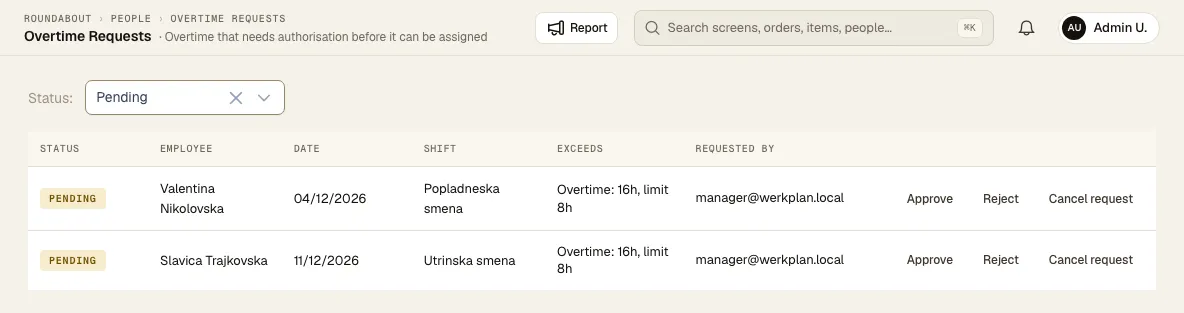
The Overtime requests screen lists the overtime requests: a shift that would take an employee past a working-time limit an authoriser can permit, waiting for someone with overtime:authorise to decide. Until it is approved, the shift isn’t placed and its seat stays empty.
The list
Section titled “The list”Status opens on Pending, what waits for a decision. Choose Approved, Rejected, Cancelled or Expired, or clear it to see every request. The soonest shift comes first.
| Column | What it shows |
|---|---|
| Status | Where the request stands: see Overtime request |
| Employee, Date and Shift | Who would work which shift on which day |
| Exceeds | Each limit the shift would break, with the figures as werkplan found them when it was asked for, such as Overtime: 16h, limit 8h |
| Requested by | The login of whoever asked |
A pending request offers Approve and Reject to someone with overtime:authorise, and Cancel request to someone with schedule:write. A decided request shows its decision’s note, if it has one.
Each time the list opens, a pending request whose shift has started becomes Expired.
Decide a request
Section titled “Decide a request”- Click Approve or Reject on the request.
- The dialog repeats the Employee, the Shift and what it Exceeds. Add a Note to an approval, or say Why not? for a rejection. A request for an anonymised employee is decided without a note.
- Click Approve or Reject.
Approving checks the limits again first, and places nothing: someone with schedule:write places the shift again, and it then goes through. See Approved.
Cancel a request
Section titled “Cancel a request”Cancel request withdraws a request nobody has decided, after you confirm with Cancel request; Keep request leaves it. The shift stays unplaced. A cancelled request can’t be opened again.
See Get overtime authorised for how a request is asked for. To let foreseeable overtime through without a request per shift, authorise a period on the Overtime authorisations screen.
Still stuck? Write to support@example.com.