Replenishment
- Available on
- Trialup to 100 production orders
- Proup to 1
- Enterprise
- Who can do this
- Open this screenRoles: Administrator, Employee
Permission: inventory:read - Add a material to its supplier's draft purchase order, or buy everything short from a supplierRoles: Administrator
Permission: purchasing:write - Make a production order for a product that is shortRoles: Administrator
Permission: order:write
- Open this screenRoles: Administrator, Employee
The Replenishment screen lists the items that are short, and gets more of them: a line on a draft purchase order for what you buy, a production order for what you make. Open it to see what to order today.
An item is listed for one of two reasons, which its Reason says:
- Below reorder level: it has a reorder level, and its stock position is below it.
- Short for open orders: a material you buy that has no reorder level, whose open orders need more than is on hand and on its way, less its safety stock.
The stock position is what is on hand, less what production orders and sales orders still need of it, plus what is on its way. So an item with enough on order isn’t listed, even while its shelf is empty. A product you make without a reorder level is never listed: a production order that needs it raises its own sub-assembly order. Only active items are listed.
The list
Section titled “The list”The items short for open orders come first, then those below their reorder level, the least available against its reorder level first. Each row shows the Item, its Reason, what is Available, its Stock position, Reorder level and Safety stock, the day it Runs out and the day to Order by, its Source and its Status. Search it by item name.
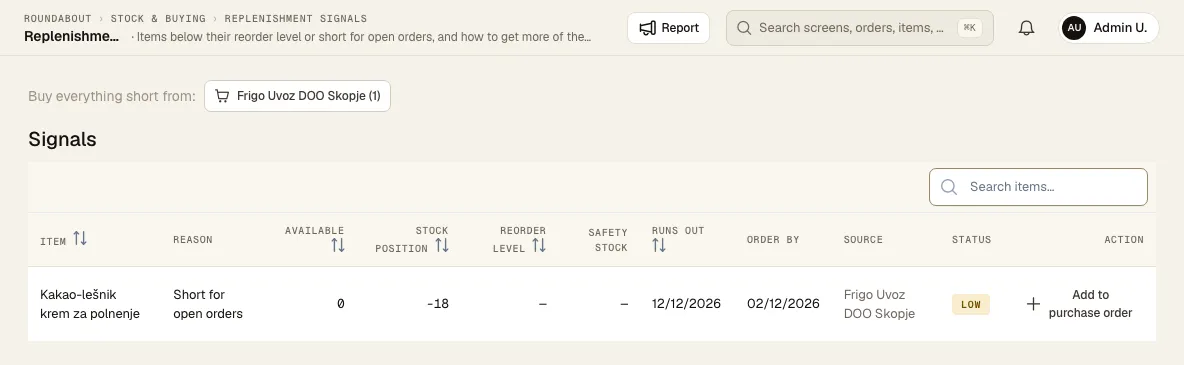
- Status is Critical when what is available is at or below the item’s safety stock, otherwise Low.
- Runs out and Order by are worked out as on What runs out next. Order by adds overdue to a day that has passed.
- Source is the default supplier of a material you buy, or No default supplier, and Make to stock or Make to order for a product.
You set an item’s reorder level and safety stock on its page: a material’s or a variant’s.
Get more of an item
Section titled “Get more of an item”The Action column, which shows to people with purchasing:write or order:write, offers what fits the item:
- Add to purchase order for a material with a default supplier. Without one, it reads Set a default supplier to order: add one on the material’s page.
- New production order for a product.
Add a material to a purchase order
Section titled “Add a material to a purchase order”- Click Add to purchase order. The dialog names the Item and its Supplier, the default one.
- Check the Quantity, in the material’s stock unit. It starts at the suggested quantity; werkplan raises it to the supplier’s minimum order and rounds it up to whole purchase units.
- If you know it, pick an Expected date for the line.
- Click Add to order.
werkplan puts the line on the supplier’s oldest draft purchase order, or on a draft it raises for them, and names the order. If the material is already on that draft, werkplan leaves it as it is and says so. Nothing is ordered until you place the draft on Purchase orders.
Buy everything short from a supplier
Section titled “Buy everything short from a supplier”Above the list, Buy everything short from: has a button for each supplier with materials short, with how many. Click one and confirm with Add to draft: werkplan puts every material short from that supplier on one draft, each at its suggested quantity, and skips those already on it. Check the quantities and prices on the draft before you place it.
werkplan refuses both while the default supplier is archived: make another supplier the default, or restore it.
Make a production order
Section titled “Make a production order”- Click New production order.
- Check the Quantity, in the product’s base unit. It starts at the suggested quantity, worked out as on What runs out next, else at what brings it back to its reorder level.
- Choose its Priority, and if you like a Due date: it is due at the end of that day.
- Click Create production order.
werkplan adds a Pending production order for the product, numbered INT- and seven digits, and records its material requirements. Scenarios and re-plans plan it from then on. It counts toward your tier’s cap on production orders. See Production order.
When an item leaves the list
Section titled “When an item leaves the list”An item stays listed until its stock position is back at its reorder level, or, for an item short for open orders, until what is on hand and on its way covers them. A placed purchase order line with an expected day counts as on its way at once, and so does a pending production order. A draft of either doesn’t count: the item stays listed until you place the purchase order, or submit the production order.
Everyone with inventory:read gets one notification a day while items are short, saying how many and how many are critical.
Still stuck? Write to support@example.com.