Overtime request
- Available on
- Trial
- Pro
- Enterprise
- Who can do this
- See an overtime requestRoles: Administrator, Shift supervisor, Employee
Permission: schedule:read - Ask for authorisation, or cancel a requestRoles: Administrator, Shift supervisor
Permission: schedule:write - Approve or reject a requestRoles: Administrator
Permission: overtime:authorise
- See an overtime requestRoles: Administrator, Shift supervisor, Employee
An overtime request asks someone with overtime:authorise to let one employee work one shift, of one shift type on one day, past a working-time limit an authoriser can permit. Nothing is placed while it waits: the seat stays empty until it is approved and the shift is placed again.
You ask for one when werkplan refuses a shift you place, and decide it on the Overtime requests screen.
What it shows
Section titled “What it shows”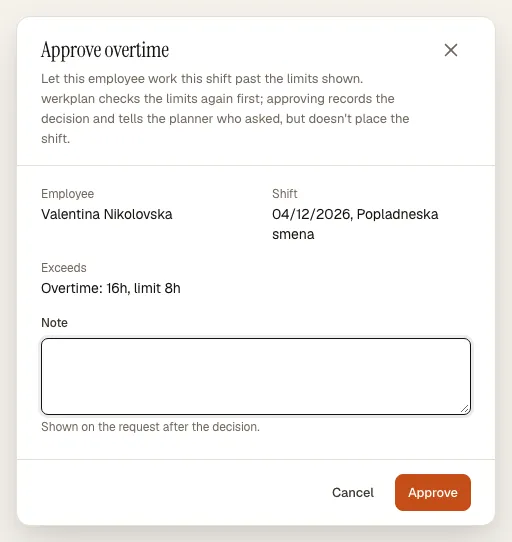
- Employee, Date and Shift: who would work which shift type on which day.
- Exceeds: each limit the shift breaks, with the figures werkplan found when it was asked for. An authoriser decides on what they read here.
- Requested by: the login of whoever asked.
- The decision’s note, once someone approved or rejected it with one.
An employee holds at most one pending or approved request for a shift type on a day. Once one is rejected, cancelled or expired, you can ask again.
Statuses
Section titled “Statuses”stateDiagram-v2 accTitle: Overtime request statuses accDescr: A request is Pending once asked for. Approve makes it Approved, Reject makes it Rejected and Cancel request makes it Cancelled. It becomes Expired when its shift starts before anyone decides, or when an approval finds it can't be granted. None of the four changes again. [*] --> Pending: Request authorisation Pending --> Approved: Approve Pending --> Rejected: Reject Pending --> Cancelled: Cancel request Pending --> Expired: Its shift starts, or approval refused Approved --> [*] Rejected --> [*] Cancelled --> [*] Expired --> [*]
| Status | How a request gets it | How it leaves it | Who moves it | What it changes elsewhere |
|---|---|---|---|---|
| Pending | Request authorisation when werkplan refuses a shift you place | Approved, rejected, cancelled or expired | Someone with schedule:write asks |
Everyone with overtime:authorise is notified; the seat stays empty |
| Approved | Approve, once werkplan checked the limits again | It doesn’t | Someone with overtime:authorise |
Placing the shift again goes through; everyone with schedule:write is notified |
| Rejected | Reject | It doesn’t | Someone with overtime:authorise |
The seat stays empty; everyone with schedule:write is notified |
| Cancelled | Cancel request | It doesn’t | Someone with schedule:write |
The seat stays empty; nobody is told |
| Expired | Its shift starts while it is pending, or an approval finds it can’t be granted | It doesn’t | werkplan | The seat stays empty; nobody is told |
Pending
Section titled “Pending”The shift waits for a decision. When a shift you set on the Schedule screen, or a candidate you assign to a coverage gap or an understaffed shift, breaks a working-time limit an authoriser can permit, werkplan refuses it and asks Ask for authorisation?, listing the limits. Request authorisation saves the request with the limits as werkplan found them then. Everyone with overtime:authorise is notified, with Overtime authorisation needed and the employee’s name.
werkplan refuses the request when the shift breaks a floor, a limit nobody can authorise: there is no one to ask. It refuses one when the employee has a pending or approved request for the same shift type that day, and a shift it would refuse before any limit, such as one outside the employee’s shift group, on an absence or overlapping another shift.
The shift isn’t placed, so it counts nowhere: not in coverage, not in production.
Approved
Section titled “Approved”An authoriser let the shift through. Approve works only before the shift starts, and checks the limits again as the schedule stands then. It goes ahead when the shift breaks nothing it didn’t break when it was asked for, and no figure is worse. Otherwise the request becomes Expired and werkplan says why.
Approving places nothing. Someone with schedule:write places the shift again, the same way, and werkplan lets it through when the approved request covers every limit the shift breaks then. It covers that employee, and that shift type on that day as a shift of the type is saved there: a longer shift from the re-plan isn’t covered. The shift is marked on the schedule as authorised overtime.
Everyone with schedule:write is notified, with Overtime request approved.
Rejected
Section titled “Rejected”An authoriser turned it down, with the reason they gave under Why not?. Rejecting checks nothing. The shift stays unplaced. Everyone with schedule:write is notified, with Overtime request rejected.
Cancelled
Section titled “Cancelled”Someone with schedule:write withdrew it with Cancel request before it was decided, such as when the seat was filled another way. The shift stays unplaced, and nobody is notified.
Expired
Section titled “Expired”Nobody may decide it any more. A request expires:
- when its shift starts while it is pending: werkplan marks it so each time the list on the Overtime requests screen opens, and when someone tries to approve it;
- when an approval finds the shift breaks a limit it didn’t break when it was asked for, or a figure is worse: ask again, so the authoriser decides on the schedule as it stands;
- when an approval finds the shift breaks a floor, which nobody may grant.
Nobody is notified. See Get overtime authorised.
Still stuck? Write to support@example.com.