Subscription
- Available on
- Trialup to 25 employees, 25 machines, 50 products and 100 production orders, for 14 days
- Proup to 150 employees, 150 machines, 500 products and 1,000 production orders
- Enterprise
- Who can do this
- Open this screenRoles: Administrator, Employee
Permission: organization:read
- Open this screenRoles: Administrator, Employee
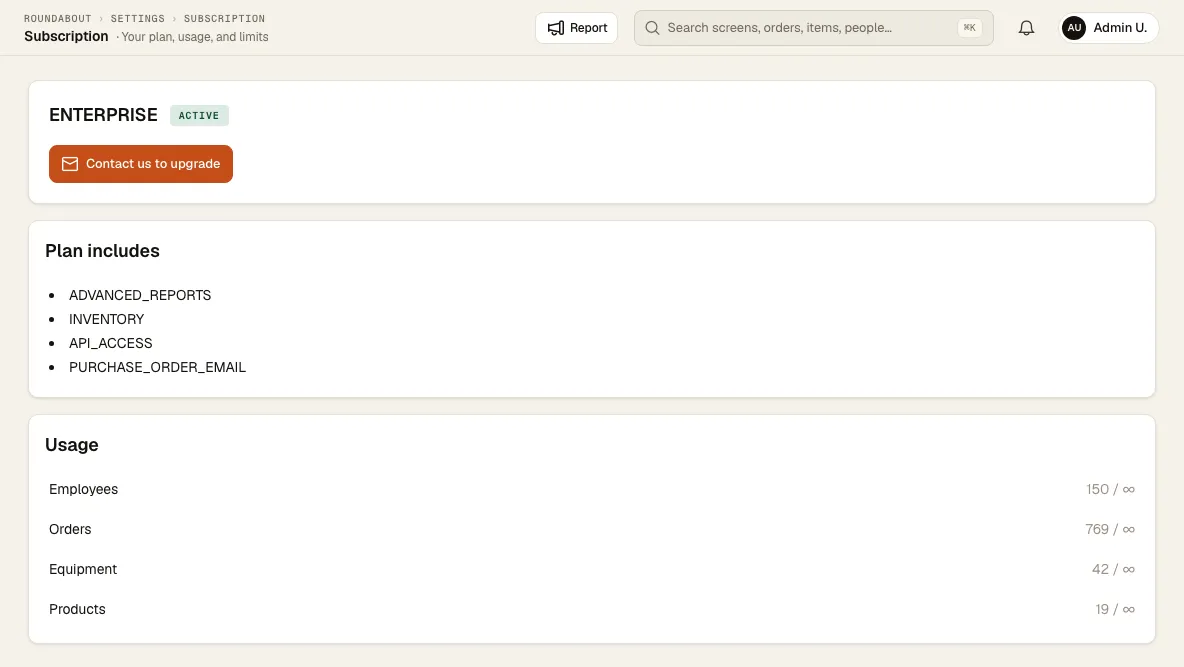
The Subscription screen shows your organisation’s subscription: its tier and its status, what the tier includes, and how many employees, production orders, machines and products your organisation holds against the tier’s caps. It changes nothing: to change your tier, ask your werkplan contact.
You find it in Settings. The trial banner’s Upgrade and the Upgrade of a refusal at a cap open it too.
What the screen shows
Section titled “What the screen shows”- The tier’s name in capitals, TRIAL, PRO or ENTERPRISE, with the subscription’s status: Trialing, Active, Expired, Canceled or Past due. A trial shows how many days are left. What each status means is on the subscription’s page.
- Contact us to upgrade, which writes werkplan an email. Moving to another tier is done by werkplan, not on this screen.
- Plan includes: the tier’s features, by their names in capitals. Every tier lists ADVANCED_REPORTS, INVENTORY and API_ACCESS, and werkplan limits nothing by them: Reports, stock and the sales-order intake API work on every tier. Pro and Enterprise also list PURCHASE_ORDER_EMAIL: emailing a purchase order to its supplier from werkplan, which a trial can’t.
- Usage: for Employees, Orders (production orders), Equipment (machines) and Products, how many your organisation holds and the tier’s cap, with a bar that fills as you near it, or ∞ where the tier has no cap.
The tiers
Section titled “The tiers”| Trial | Pro | Enterprise | |
|---|---|---|---|
| Employees | 25 | 150 | No cap |
| Orders | 100 | 1,000 | No cap |
| Equipment | 25 | 150 | No cap |
| Products | 50 | 500 | No cap |
| Emailing purchase orders | No | Yes | Yes |
A count holds every record of its kind, whatever its status. At a cap, werkplan refuses to add one more of that kind on its screen, or to duplicate one, and says so with Upgrade, which opens this screen. Delete records you no longer need, or ask your werkplan contact for a higher tier.
Where to go next
Section titled “Where to go next”- What each status means, and what happens when a trial ends: Subscription.
- The routine for users, roles and the subscription: Run your account.
Still stuck? Write to support@example.com.