Quote
- Available on
- Trial
- Pro
- Enterprise
- Who can do this
- Open a quote's pageRoles: Administrator, Employee
Permission: order:read - Add a line, send it, accept it or decline itRoles: Administrator
Permission: order:write
- Open a quote's pageRoles: Administrator, Employee
A quote is an offer to a customer: items, at prices, until a day. Its status says whether it is still being written, has gone to the customer, was accepted into a sales order or was declined.
You open a quote from the Quotes screen. A quote never changes production: werkplan plans nothing for it, reserves nothing and counts nothing of it as demand.
What its page shows
Section titled “What its page shows”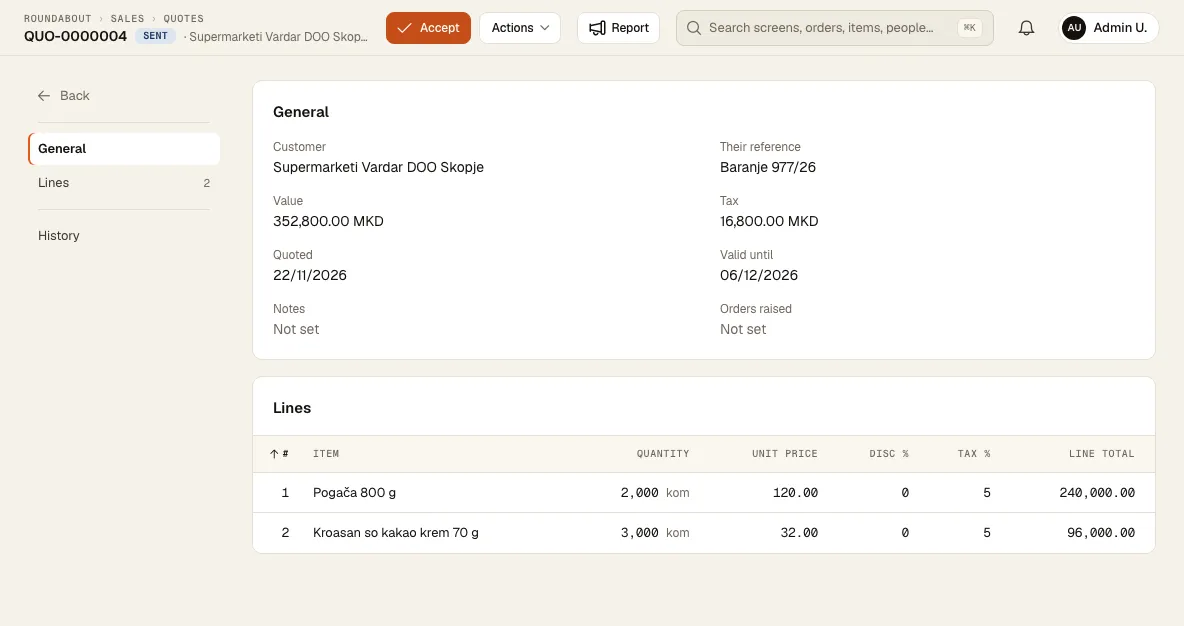
Its title is the quote number, with the customer and its status.
- General: the Customer, Their reference, Value, Tax, the day it was Quoted, the day it is Valid until, or Until withdrawn, its Notes and the Orders raised from it.
- Lines: each line’s Item, Quantity, Unit price, Disc %, Tax % and Line total. A line nobody priced reads Not priced and adds nothing to the value.
- History: who created the quote and who changed it last, and when.
Notices above the panels say why a declined quote was declined, why a lapsed quote can’t be accepted, and which sales orders it was accepted onto.
The main button is Send on a draft with lines and Accept on a quote that still stands. Actions holds Decline on a sent quote.
Statuses
Section titled “Statuses”A quote starts as a draft. Send marks it as gone to the customer; the customer’s answer makes it accepted or declined.
stateDiagram-v2
  accTitle: Quote statuses
  accDescr: A quote is created as a draft. Send makes it sent. From sent, Accept makes it accepted and Decline makes it declined. An accepted quote can be accepted again.
  [*] --> Draft: Create quote
  Draft --> Sent: Send
  Sent --> Accepted: Accept
  Accepted --> Accepted: Accept again
  Sent --> Declined: Decline
| Status | How a quote gets it | How it leaves it | What it changes |
|---|---|---|---|
| Draft | Create quote in New quote | Send | Lines can be added; nothing else |
| Sent | Send | Accept, or Decline | Its lines are fixed and its currency set |
| Accepted | Accept | Never; it can be accepted again | A draft sales order with its lines, for each acceptance |
| Declined | Decline, with a reason | Never | Nothing; the reason stays on it |
Every move needs the permission order:write. A quote is never deleted, and no status brings one back to Draft.
The quote is being written, and the customer hasn’t seen it. Add line adds an item: any active product or material you sell, its Quantity in the item’s own unit, and a Unit price, Discount % and Tax %. An empty price or discount is filled from the customer’s price lists or standing discount, as Price lists explains, and written onto the line. A line can’t be changed or removed once added: to correct one, make another quote.
Send makes it Sent. werkplan refuses to send a quote with no lines, or while your organisation has no currency set on the Organization screen.
The quote has gone to the customer, who holds this copy, so its lines can’t change. Sending sets the day it was Quoted to that day and writes your organisation’s currency onto it. werkplan doesn’t send the quote itself: send it to the customer yourself.
Accept turns it into a sales order, and Decline records that the customer said no. After its Valid until day the quote reads Sent — lapsed and can’t be accepted: make another quote to offer it again.
Accepted
Section titled “Accepted”The customer took the offer. Accept asks for a Due date, set on the sales order and on each of its lines; leave it empty to have its production planned as early as it can be. werkplan then makes a Draft sales order for the quote’s customer, with its reference and each of its lines at its quoted price, discount and tax, and opens it. A line quoted without a price stays unpriced on the sales order. See Turn a quote into a sales order.
Nothing is planned until you confirm that sales order. An accepted quote can be accepted again, such as a customer taking half this week and the rest later: each acceptance makes another sales order, and Orders raised lists them all. werkplan refuses to accept a lapsed quote, and one in another currency than your organisation’s.
Declined
Section titled “Declined”The customer turned the offer down. Decline asks for the Reason, kept on the quote; Common reasons offers a start, such as Price — went with a competitor. A declined quote can’t be accepted. Only a sent quote can be declined: an accepted quote’s sales order is cancelled instead.
Still stuck? Write to support@example.com.