Working-time consents
- Available on
- Trial
- Pro
- Enterprise
- Who can do this
- Open this screenRoles: Administrator, Shift supervisor, Employee
Permission: schedule:read - Record or revoke a consentRoles: Administrator
Permission: overtime:authorise - With overtime:authorise, choose the employee in Record consentRoles: Administrator, Shift supervisor, Employee
Permission: employee:read
- Open this screenRoles: Administrator, Shift supervisor, Employee
The Working-time consents screen is the register of the working-time consents your employees signed: each raises one working-time limit for one employee, up to a figure, or lifts one kind of their restrictions, on the days it holds. werkplan records a consent signed on paper; it doesn’t collect one.
Recording a consent says that a named person signed something, so it needs overtime:authorise, which only the Administrator role holds by default.
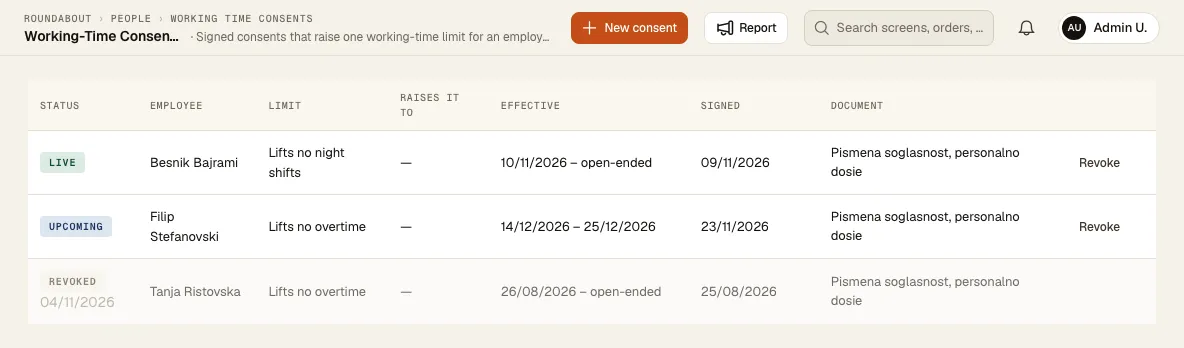
The list
Section titled “The list”The live consents come first, then the upcoming ones, then those that ended, which are dimmed.
| Column | What it shows |
|---|---|
| Status | Live, Upcoming before its first day, Expired after its last, or Revoked, with the day it was revoked. A revoked consent reads Revoked whatever its dates |
| Employee | Who signed it |
| Limit | The limit it raises, such as Overtime a year, or the restriction it lifts, such as Lifts no night shifts, with its reason under it |
| Raises it to | The figure, such as up to 230 h a year, or without a ceiling; a dash for a restriction |
| Effective | Its first and last day, or open-ended |
| Signed | The day the employee signed |
| Document | Where the signed paper is kept |
Revoke stands beside each consent that hasn’t ended, for someone with overtime:authorise. An employee’s own consents are on their page too, under Consents: see Employee.
Record a consent
Section titled “Record a consent”Your labour rules say which limits a consent may raise, and how far, under Authorisation and consent: by default, none. See Floors and authorisable limits.
- Click New consent.
- Choose the Employee.
- Choose the Limit: only the limits your labour rules let a consent raise are offered.
- Enter what the Consent raises it to: above the limit, and at most the ceiling your labour rules allow, which it starts at. Where they set no ceiling, the consent raises it without one and asks for no figure.
- Give a Reason where your law names the case, such as a strategic project.
- Enter the Date the employee signed, and the days it holds: Effective from, and Effective to, or leave that empty for a consent that holds until it is revoked.
- If you like, enter the Notice to revoke (days) the employee gives, and Where the signed document is held.
- Click Record.
When no limit may be raised by consent, Record consent says so: set one in your labour rules first. A consent for an anonymised employee takes no reason and no document.
werkplan stores no document and checks nothing about it, nor about the notice to revoke: it keeps both for your records.
Lift a restriction by consent
Section titled “Lift a restriction by consent”Some restrictions lift with the employee’s written consent, as your labour rules set for each protected status. On the employee’s page, under Restrictions, click Lift by consent on such a restriction. Record consent to lift a restriction records a consent lifting that kind of restriction, over the restriction’s days to start with, with no limit and no figure. werkplan refuses it when the employee has no restriction of that kind, liftable by consent, on those days.
What a consent changes
Section titled “What a consent changes”On each day it holds, a consent changes how a shift you place for the employee is checked:
- A consent on a limit raises the limit for them up to its figure, whatever the limit’s class, and never past the ceiling your labour rules allow when the shift is checked. A shift within it passes without an overtime authorisation. Past it, the limit is a floor or authorisable as for anyone.
- A consent on a restriction lifts their restrictions of that kind that are liftable by consent. A restriction that isn’t liftable stays.
An employee may hold several consents; for each limit, the highest raises it. Each check of a shift you place by hand reads consents: Set shift, filling a coverage gap, an understaffed shift’s Assign, each side of a swap and an overtime request. Plan workforce never does: it plans within every limit and every restriction as your labour rules set them.
Revoke a consent
Section titled “Revoke a consent”Click Revoke and confirm. From the day it is revoked, by the date in UTC, the employee’s shifts past the limit fall to the limit’s class again, or their restrictions of that kind bar their shifts again. The consent stays on the list: shifts placed under it before then stay as they are.
Still stuck? Write to support@example.com.