Reports
- Available on
- Trial
- Pro
- Enterprise
- Who can do this
- Open this screenRoles: Administrator, Shift supervisor, Employee
Permission: schedule:read - See the cards of a time windowRoles: Administrator, Employee
Permission: purchasing:read
- Open this screenRoles: Administrator, Shift supervisor, Employee
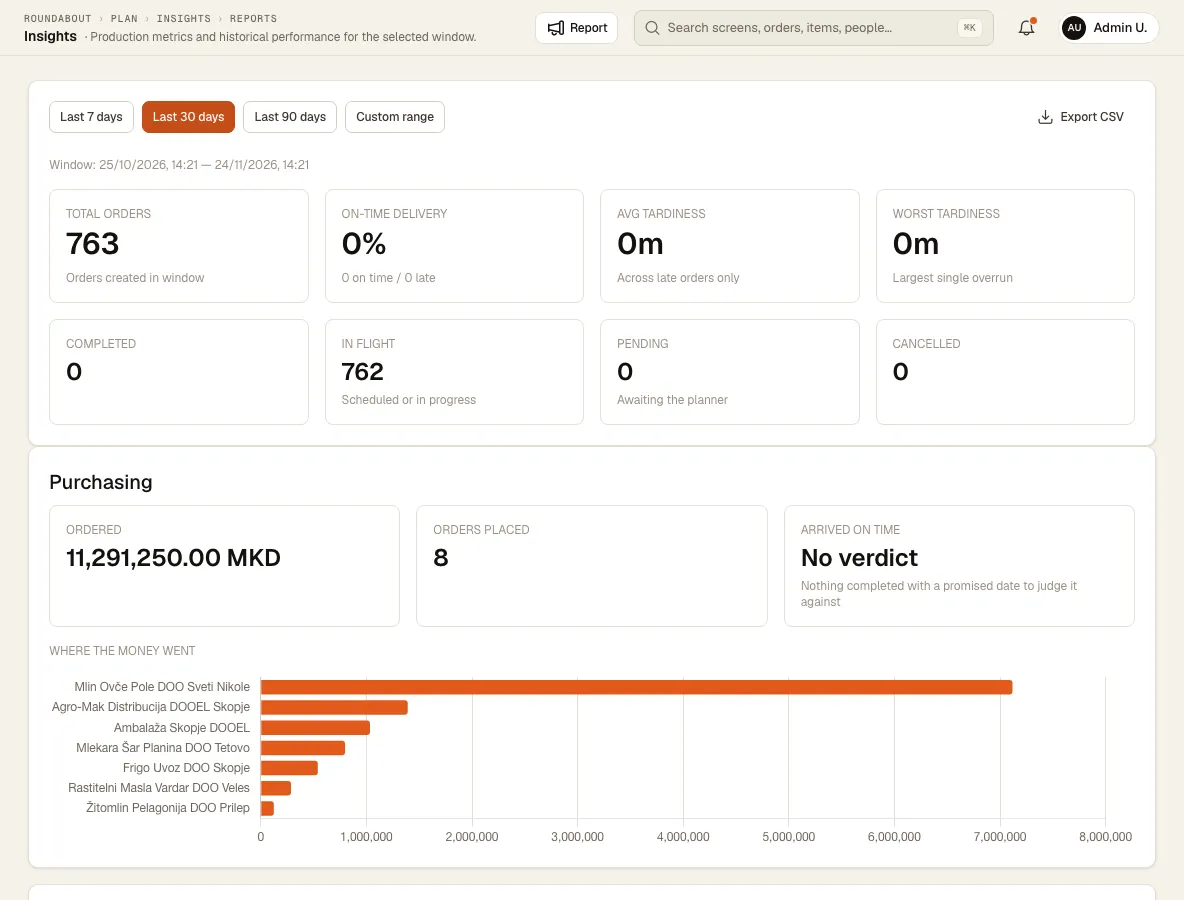
The Reports screen shows how production, purchasing, planning, your machines, your people and your stock did over a time window you choose. Its title reads Insights.
Choose Last 7 days, Last 30 days, which it shows first, Last 90 days or Custom range with a From and To date, and Apply. Export CSV at the top saves the production figures; Equipment Utilization, Workforce and Inventory Snapshot each have an Export CSV of their own.
The cards of a time window load together, and one of them reads purchasing: someone who may not read purchasing (purchasing:read) sees Failed to load report. in their place.
The cards
Section titled “The cards”- The production figures: the orders created in the window (Total orders), On-time delivery, Avg tardiness across late orders and Worst tardiness, and how many are Completed, In flight, Pending and Cancelled.
- Purchasing: what you ordered, from whom, and whether suppliers delivered on time.
- Did the plan hold?: for finished work, the time each step took against its planned time, with its scrap, and the material issued against the bill of materials.
- Equipment Utilization: the units in use and idle, and the time scheduled on them.
- Workforce: Active employees, Shift assignments, Rest days, and Unassigned, the active employees with no shifts.
- Inventory Snapshot: stock health as it is, whatever the window: active materials, those without usable stock, and those expiring within 30 days or past expiry.
Still stuck? Write to support@example.com.