Sales order
- Available on
- Trial
- Pro
- Enterprise
- Who can do this
- Open a sales order's page, and print its packing list and delivery notesRoles: Administrator, Employee
Permission: order:read - Change it, confirm or cancel it, cancel a line, re-check its fulfilment, and record a returnRoles: Administrator
Permission: order:write - Pack and deliver it, start or cancel a pick list, and restock a returnRoles: Administrator
Permission: inventory:write
- Open a sales order's page, and print its packing list and delivery notesRoles: Administrator, Employee
A sales order is what a customer ordered, line by line, each line an item and a quantity. Its status says whether it promises anything yet: a Draft promises nothing, a Confirmed sales order is demand werkplan plans production for, and a Cancelled one owes nothing.
You open a sales order from the Sales orders screen, or from the production order raised for one of its lines.
What its page shows
Section titled “What its page shows”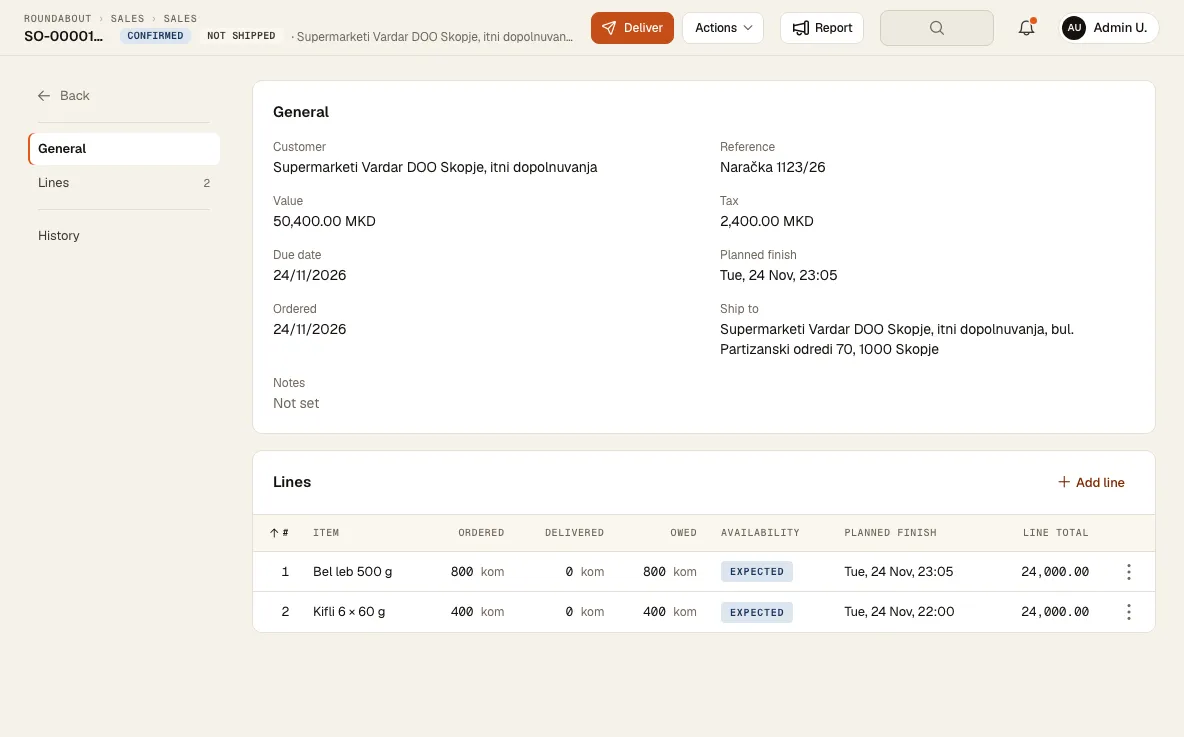
Its title is the sales order number, with the customer, its status and its delivery status.
- General: the Customer, Reference, Value with tax, Tax, Due date, Planned finish, the day it was Ordered, where it ships to (Ship to) and its Notes. The planned finish is the latest of its lines’.
- Lines: each line’s Item, how much is Ordered, Packed (once anything is), Delivered and still Owed, its Availability, its Planned finish and its Line total. See Lines.
- Deliveries, once anything has gone out: each shipment, with its Delivery note. See Delivery.
- Pick lists, once one has been started: see Pick list.
- Returns, once anything has gone out: see Return.
- History: who created the sales order and who changed it last, and when.
Notices above the panels say why a cancelled sales order was cancelled, how many lines can’t be filled, and, after a change to a confirmed sales order, what the change did to its production (Production followed the change), each production order linked by its number, until you click Dismiss.
The main button is Confirm on a draft and Deliver on a confirmed sales order that still owes something. Actions holds Pack, Create pick list, Re-check fulfilment, Edit, Packing list and Cancel order, each where the sales order’s status and your permissions allow it. The packing list is a PDF of what is in the box, without prices.
A line asks for an item, any active product or material you sell, in the item’s own unit, with a price, a discount, a tax rate and, if you like, a due date of its own. A line without a date follows the sales order’s.
Availability says how the line will be filled:
| Availability | What it means |
|---|---|
| In stock | Free stock on the shelf covers what the line still owes. Deliver takes it from the same stock. |
| Expected | A production order raised for the line is making it, or the shelf and the supply on its way, such as an open purchase order, cover it between them. |
| Not available | No production order raised for the line makes it, and the shelf and the supply on its way together fall short of what it owes. A notice above the panels counts these lines. |
| Delivered | The line owes nothing more. |
| Cancelled | The line was cancelled and owes nothing. |
Planned finish says when the line can go out:
| Planned finish | What it means |
|---|---|
| A day and a time, such as Tue, 24 Nov, 14:00 | The master plan in force finishes the line’s production order then. |
| From stock | No production order raised for the line makes it, and free stock on the shelf covers it; it waits for nothing. |
| Awaiting supply | No production order raised for the line makes it, and the shelf alone falls short, but with the supply on its way, such as an open purchase order or a production order raised for something else, it is covered. The line can go out once that supply arrives. |
| Not planned yet | A production order makes the line, but the master plan in force doesn’t hold it: it was raised after the last promote, it was on hold or couldn’t be planned then, or no master plan is in force. The next re-plan or scenario plans it. |
| Empty | A draft, a cancelled sales order or line, a delivered line, or a line Not available. |
A line’s production order under way that the sale no longer needs as it is shows a note under the item, linked to that production order: Under way, so kept: its sale was cancelled. or Under way, so kept: makes …, its sale now needs …. See What a change does to production.
On a draft, Edit line and Delete line change or remove a line. On a confirmed sales order, Edit line changes a line’s quantity, price, discount, tax, due date and notes, and Cancel line cancels it; the item stays. See Change a confirmed sales order.
Statuses
Section titled “Statuses”A sales order starts as a draft. Confirm makes it a promise to the customer, and Cancel order ends it. How much of it has gone out is its delivery status, beside it: see Delivery.
stateDiagram-v2
  accTitle: Sales order statuses
  accDescr: A sales order is created as a draft, by hand, by accepting a quote or through the intake API. Confirm makes it confirmed. A draft or a confirmed sales order can be cancelled.
  [*] --> Draft: Create draft, Accept a quote, or the intake API
  Draft --> Confirmed: Confirm
  Draft --> Cancelled: Cancel order
  Confirmed --> Cancelled: Cancel order
| Status | How a sales order gets it | How it leaves it | Planned? | In stock |
|---|---|---|---|---|
| Draft | Create draft in New sales order, Accept on a quote, or a source system sends it | Confirm, or Cancel order | No; nothing is raised | Not demand |
| Confirmed | Confirm | Cancel order | Its production orders are planned by the next scenario or re-plan | Its undelivered quantities are demand; deliveries take goods out |
| Cancelled | Cancel order, with a reason | Never | Its production not started is cancelled | Not demand |
Confirming and cancelling need the permission order:write. A sales order is never deleted: cancelling keeps it on record.
The sales order is being entered or waits to be checked, and promises nothing: werkplan raises no production for it, counts none of it as demand, and the shop floor never sees it. Everything on it can change. Edit changes its customer, due date, reference, ship-to address and notes; a changed customer leaves the lines’ prices as they are. Add line, Edit line and Delete line change its lines. A line you add is priced from the customer’s price lists or standing discount, as Price lists explains.
Confirm makes it Confirmed. werkplan refuses to confirm a sales order with no lines, or while your organisation has no currency set on the Organization screen. A sales order made from a quote is confirmed only in the quote’s currency: if your organisation’s currency changed after the quote was sent, cancel the sales order and make another quote.
Confirmed
Section titled “Confirmed”The sales order is a promise to the customer. Confirming writes your organisation’s currency onto it and, when it has no ship-to address of its own, copies the customer’s default shipping address onto it. It then decides each line: what the shelf and the supply on its way don’t cover of a manufactured item, werkplan raises a production order for, Pending, as What a change does to production explains. A purchased item raises nothing: its line waits for stock, and the Replenishment screen shows it.
Its undelivered quantities count as demand in the item’s stock figures, and only a delivery takes goods out of stock: confirming reserves nothing. You pack it, start a pick list and deliver it: see Deliver a sales order. Its customer and its lines’ items no longer change; everything else does, and each change re-decides its production. A line is cancelled rather than deleted.
A fully delivered sales order stays Confirmed: its delivery status says Delivered.
Cancelled
Section titled “Cancelled”The sales order owes the customer nothing. Cancel order asks first, then cancels it with the reason “Cancelled from the order screen”, shown above its panels. In the same step werkplan cancels its production orders that haven’t started, and keeps those already under way, flagged for a planner to finish or cancel. Its undelivered quantities stop counting as demand. What it delivered stays delivered.
werkplan refuses to cancel a sales order while it has an open pick list: cancel the pick list first. A cancelled sales order can’t be changed, confirmed, packed or delivered; goods it delivered can still come back as returns.
What a change does to production
Section titled “What a change does to production”werkplan keeps a confirmed sales order’s production in line with it. Each change below decides again what each line it touches needs production to make: what the line still owes, less what the shelf and the supply on its way cover. A line’s own production order isn’t counted as that supply, and the cover is shared out over the sales order’s lines in their order, so two lines of one item don’t count the same stock.
| Change | Lines decided again |
|---|---|
| Confirm | Every line |
| Add line on a confirmed sales order | That line |
| A quantity changed in Edit line | That line |
| Cancel line | That line, which then needs nothing |
| A delivery | The lines delivered |
| Cancel order | Every line, which then needs nothing |
| Re-check fulfilment | Every line, against today’s stock |
For each line decided:
- With no production order of its own and something to make, a manufactured item’s line gets a production order, Pending, for exactly what is needed. It starts at the customer’s priority, a Critical customer’s at High, and is due at the end of the line’s due date, or the sales order’s when the line has none; with neither, it has no due date and is never late.
- Its production order not yet started is resized to what is needed, or cancelled when nothing is.
- Its production order already started is never resized or cancelled. It is kept as it is and flagged with what the sale needs of it, on the line and on the production order’s page, for a planner to finish or cancel.
A changed due date, on the line or on the sales order for lines without their own, moves the due date of the line’s production order, started or not; it decides nothing else. A quantity you change by hand on such a production order stands until its line is decided again, and a due date you change by hand until the line’s date changes. Stock that moves, such as a delivery received or one voided, decides nothing by itself: click Re-check fulfilment in Actions.
When the master plan in force holds work of a production order that a change resizes or cancels, the change opens an exception of the kind Quantity changed or Cancelled, and every planner is told; the re-plan takes it in. Every raise, resize, move and cancel is a change the master plan’s Show changes lists on the Master plan screen. werkplan tells the customer nothing.
Still stuck? Write to support@example.com.