What runs out next
- Available on
- Trial
- Pro
- Enterprise
- Who can do this
- Open this screenRoles: Administrator, Employee
Permission: inventory:read
- Open this screenRoles: Administrator, Employee
What runs out next shows when the orders you have will use up each item’s stock, and the last day to order more so it arrives in time. Open it to decide what to buy first.
It reads only what is on the books: stock on hand, what your production orders and sales orders still need, and what is on its way. It doesn’t guess from past use, so an item nothing is committed against never runs out here.
The list
Section titled “The list”Each row is an active item, a material or a product, with what is On hand, the day it Runs out, the day to Order by, the Suggested quantity to order and its default Supplier. The tag at the end says how urgent it is:
- Too late to order: the order-by day has passed, so an order placed today arrives after the item runs out.
- Order in time: it runs out, and its order-by day hasn’t passed, or it has no lead time to count back from.
- Covered: nothing on the books uses it up.
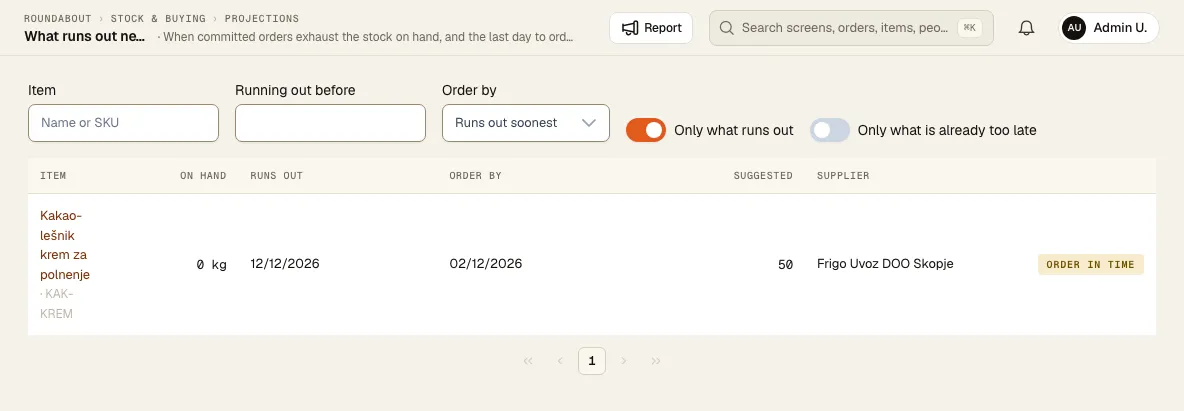
Runs out reads Not from what is on the books for an item nothing uses up. Order by reads No lead time recorded for an item that runs out but has no default supplier with a lead time, and adds already past to a day that has gone. Suggested is — when there is nothing to order for. Click an item to see its stock.
Narrow it down
Section titled “Narrow it down”- Item: part of an item’s name or SKU.
- Running out before: only items that run out on or before that day.
- Order by: the order of the rows: Runs out soonest, which opens first, Order-by date, Item name or Stock on hand. Sorted by a day, items without one come last.
- Only what runs out: on when the screen opens, so you see only items that run out. Turn it off to see every active item.
- Only what is already too late: only items whose order-by day has passed.
How werkplan works it out
Section titled “How werkplan works it out”For each item, werkplan starts from the usable stock on hand, in your own active locations, and walks forward day by day:
- it takes off what production orders still need of it, on each order’s due date, or today for an order without one;
- it takes off what sales orders still have to deliver, on the day the customer wants it;
- it adds what placed purchase orders for goods still have to deliver, on the day each line is expected, unless the order was closed short;
- it adds what production orders make for stock, on their due dates, and stock on its way between your locations, on the day it is expected.
On a day with both, what comes in counts first. The first day the stock goes below zero is the day it Runs out. Order by is that day less the lead time of the item’s default supplier, in calendar days. Suggested is the most the stock falls short within one lead time after it runs out, or on the day it runs out when there is no lead time, and at least the supplier’s minimum order.
A placed purchase order counts as on its way only for lines with an expected day: see Purchase order. A draft doesn’t count until you place it.
What to do with it
Section titled “What to do with it”- For a material, raise a purchase order on Purchase orders, or add it to its supplier’s draft from Replenishment.
- When a delivery won’t come in time, ask the supplier for an earlier day, and update the order’s expected day: see Change when a delivery is expected.
This screen changes nothing: it only reads. The material-ready times planning uses are worked out separately, when a scenario or a re-plan is made: see What materials change in planning.
Still stuck? Write to support@example.com.