Lots
- Available on
- Trial
- Pro
- Enterprise
- Who can do this
- Open this screenRoles: Administrator, Employee
Permission: inventory:read - Open a lot's pageRoles: Administrator, Employee
Permission: inventory:read - Quarantine a lot or release it, on its pageRoles: Administrator
Permission: inventory:quarantine
- Open this screenRoles: Administrator, Employee
The Lots screen lists every lot of the materials and products you track by lot: each batch, what it holds and when it expires. Use it to find what to use first and which batch to hold back.
The screen’s heading reads Stock Lots, and the menu lists it under Stock & buying, among the details. werkplan adds a lot when lot-tracked stock is received: see Lot.
The list
Section titled “The list”The list shows each lot’s Lot #, Material, Status, what it holds On hand, when it Expires and when it was Created. Show it as Cards or as a Table, search it by lot number, sort it by soonest expiry, and filter it by Lot #, Status, Expires and Created.
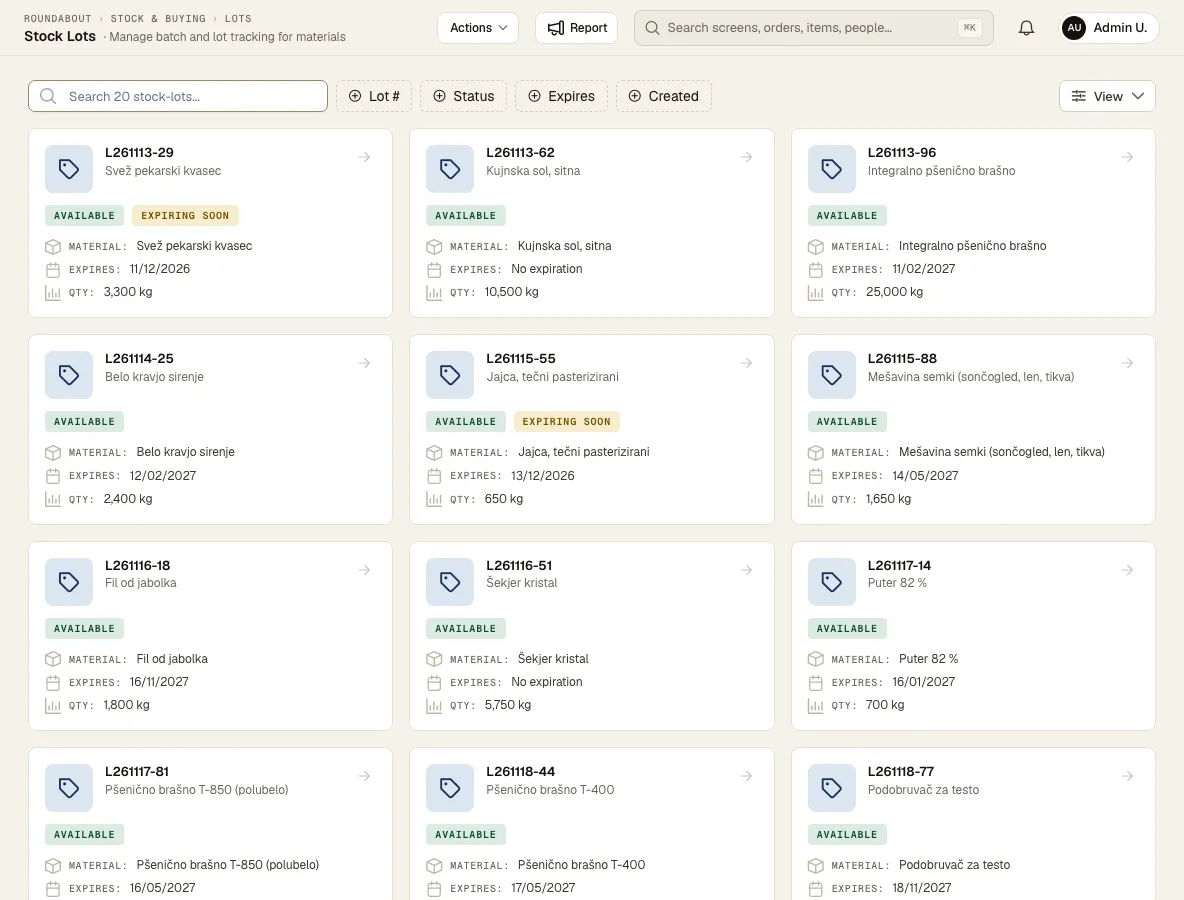
- Status is one of Available, Quarantine, Expired and Depleted.
- A lot that expires within 30 days is marked Expiring Soon, and its expiry is in the warning colour. Once its expiration date has passed, the mark turns red.
Click a lot to open its page, where you quarantine or release it and trace where it went and where it came from: see Lot.
Still stuck? Write to support@example.com.