Transactions
- Available on
- Trial
- Pro
- Enterprise
- Who can do this
- Open this screenRoles: Administrator, Employee
Permission: inventory:read - Open a transaction's page, and print an adjustmentRoles: Administrator, Employee
Permission: inventory:read - Post an adjustment, or copy one with DuplicateRoles: Administrator
Permission: inventory:write - Void a transactionRoles: Administrator
Permission: inventory:void
- Open this screenRoles: Administrator, Employee
The Transactions screen lists every stock movement werkplan has booked: receipts, issues, adjustments, transfers, and the records of stock reserved and released. It is the history behind every stock figure, and where you undo a movement booked by mistake.
The screen’s heading reads Stock Transactions. See Transaction for each kind of movement and what voiding one does.
The list
Section titled “The list”The list shows each transaction’s Transaction #, Type, Status, how many Lines it has and its Date, newest first. Show it as Cards or as a Table, search it, and filter it by Transaction #, Type, Status and Date.
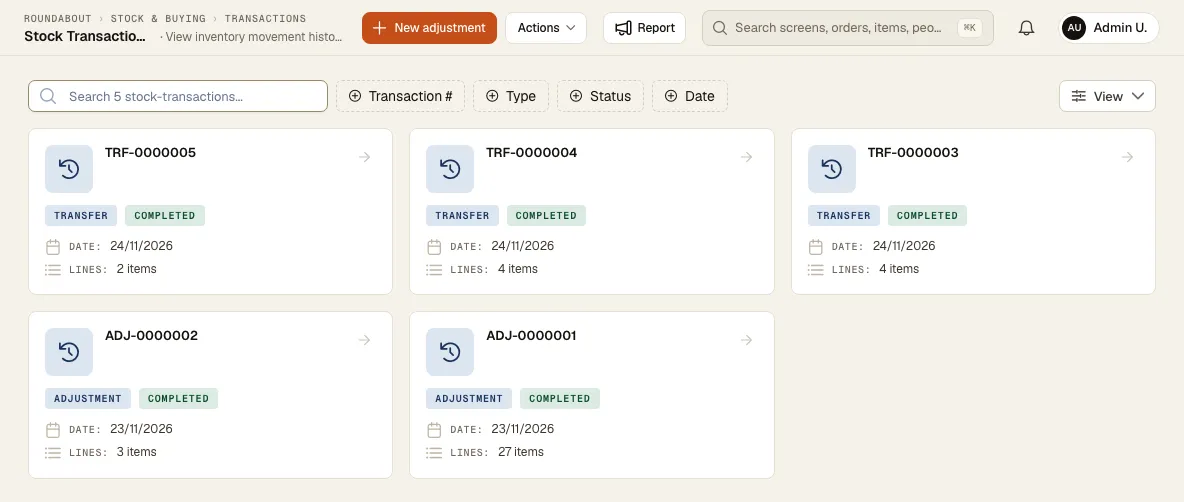
- Type is Receipt, Issue, Adjustment, Reservation, Release or Transfer.
- Status is Completed, or Cancelled once it was voided.
Opened from Movements on the Stock screen, or from On hand on an item’s stock page, the list shows that item’s movements alone; Show every movement shows them all again.
Click a transaction to open its page, where you print an adjustment, copy it with Duplicate, or Void it: see Transaction.
Post an adjustment
Section titled “Post an adjustment”New adjustment opens Adjust stock: give the Reason, and a line for each item whose stock is wrong, with the Quantity change, plus to add and minus to write off. It posts when you save, and its page opens, ready to print. See Correct stock on hand.
Void a movement
Section titled “Void a movement”On a transaction’s page, open Actions and click Void, give the Reason and click Void transaction. werkplan books a reversal that undoes the movement’s effect on stock, and the original stays in the list as Cancelled. See Void a stock movement.
Still stuck? Write to support@example.com.