Material requirement
- Available on
- Trial
- Pro
- Enterprise
- Who can do this
- Open a material requirement's pageRoles: Administrator, Employee
Permission: order:read - Reserve stock for it, or cancel itRoles: Administrator
Permission: order:write - Consume or release one of its reservationsRoles: Administrator
Permission: inventory:write
- Open a material requirement's pageRoles: Administrator, Employee
A material requirement is what one production order needs of one material: the quantity its bill of materials asks for, how much has been issued to production and what remains. Its status follows what has been issued: Pending while nothing has, Partially Issued, then Issued, or Cancelled when it is no longer needed.
You open a requirement from the Material requirements screen. A production order’s page lists its own under Materials: see Production order.
When werkplan records them
Section titled “When werkplan records them”A requirement is one line of an order’s bill of materials: the material, times the quantity the order line makes. werkplan records them:
- for a production order you add by hand, when you click Submit for scheduling, and it reserves what is in stock at once;
- for an order raised for a sales line, made on the Replenishment screen or from a production order’s bill of materials, or imported, when the order is created, and it reserves at the next promote;
- for a sub-assembly order, at the promote that creates it;
- for a QA rejection’s replacement, for the rejected quantity, when the rejection is recorded.
On an order that isn’t cancelled or completed, Generate requirements under Materials records any its bill of materials calls for that are missing.
While its order is open and not started, each promote brings its requirements back in line with the bill of materials: it resizes them, records one for a line that was added, and cancels one whose line was taken away. A started order keeps the requirements it has.
What its page shows
Section titled “What its page shows”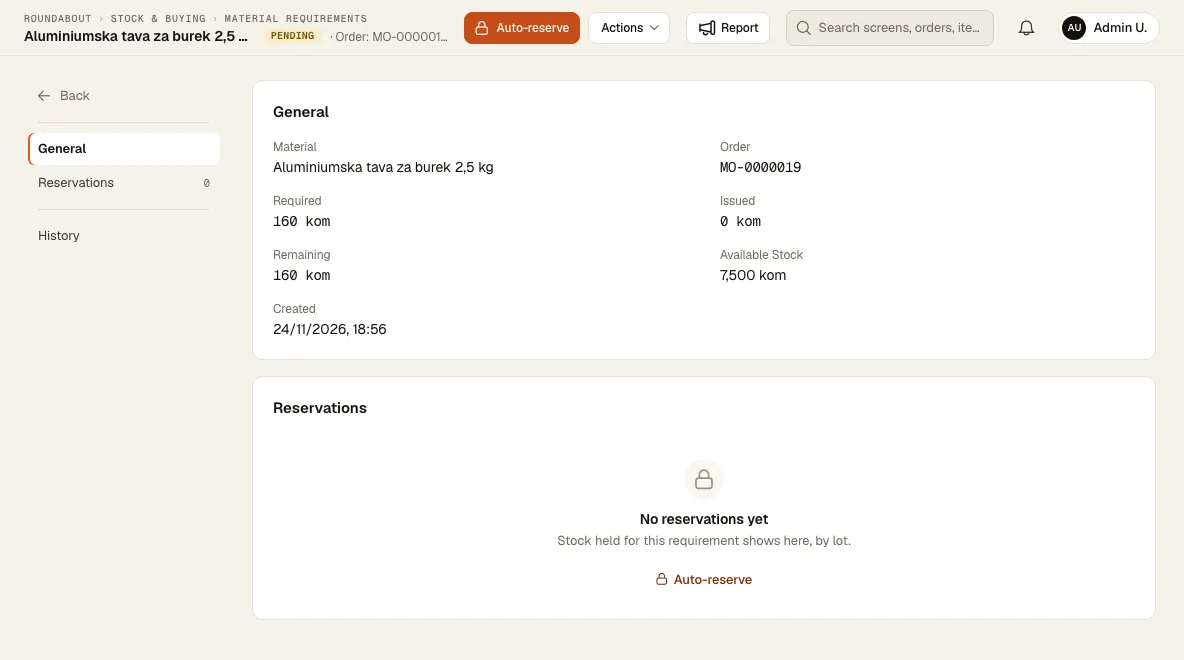
- The top bar: the material, its production order and its status. Auto-reserve while something remains to issue.
- General: the Material, the Order, what is Required, Issued and Remaining, the Available Stock of the material, marked insufficient when it is less than what remains, and when it was Created.
- Reservations: the stock set aside for it, each with its Material, Lot, the quantity Reserved and its Status.
- History: who created it and who changed it last, and when.
Actions holds Open order, which opens its production order, and, while something remains to issue, Manual reserve and Cancel.
Reserve stock for it
Section titled “Reserve stock for it”Reserved stock is set aside for this order: it is no longer free, so it can’t be issued to other work or moved to another location.
- Auto-reserve reserves as much free stock as there is, up to what remains, lots that expire first and then the oldest stock. It reserves what it finds and leaves the rest open.
- Manual reserve opens Reserve stock: pick one Balance, a place where usable stock lies, by its Location, Lot and Bin, enter the Quantity to reserve, at most what is still needed and free, and click Reserve.
On a reservation’s row, Consume issues the reserved stock to production: it leaves stock, and adds to what is Issued. Release gives it back to free stock.
How material is issued
Section titled “How material is issued”- Consume on a reservation issues it.
- Completing the production order issues what remains of each requirement, sized by the bill of materials for what the line ordered, or for what it made when it made more, less what its sub-assembly orders make: what is reserved first, then free stock. What the stock doesn’t cover stays open, and the completed order’s Materials offers Issue once the stock is there, and Close the rest, which cancels what remains.
- Cancelling the production order issues what its first step used, cancels the rest of its requirements and releases their reservations.
Statuses
Section titled “Statuses”werkplan works out Pending, Partially Issued and Issued from what has been issued and what is required. Only cancelling is a choice: Cancel here, or Close the rest and Cancel all under the order’s Materials.
stateDiagram-v2
  accTitle: Material requirement statuses
  accDescr: A requirement is recorded Pending. Issuing some of it makes it Partially issued, issuing all of it Issued, and more required makes an issued one Partially issued again. Cancel, or cancelling its production order, cancels it, and a promote can bring back one you cancelled while its order is open and not started.
  state "Partially issued" as Partial
  [*] --> Pending: Recorded from the bill of materials
  Pending --> Partial: Some issued
  Pending --> Issued: All issued
  Partial --> Issued: The rest issued
  Issued --> Partial: More required
  Pending --> Cancelled: Cancel, or its order cancelled
  Partial --> Cancelled: Cancel, or its order cancelled
  Cancelled --> Pending: A promote, while its order is open and not started
| Status | How a requirement gets it | How it leaves it | Counted as demand |
|---|---|---|---|
| Pending | Recorded, and nothing issued yet | Some or all of it issued, or cancelled | All of it, on an order past its draft |
| Partially Issued | Some of it issued, or more required of an issued one | The rest issued, or cancelled | What remains, on an order past its draft |
| Issued | All of it issued | More required of it, when a line makes more than it ordered | Nothing |
| Cancelled | Cancel, Cancel all, Close the rest, its production order cancelled, or its line taken off the bill of materials | A promote brings it back, while its order is open and not started and its bill of materials has the line | Nothing |
Cancel, Cancel all, Issue and Close the rest need the permission order:write; Consume needs inventory:write. On a draft production order, a requirement counts as nothing.
Pending
Section titled “Pending”Nothing has been issued yet. All of it, less what the order’s sub-assembly orders make of it, counts as demand for the material: committed on the Stock screen, taken off on What runs out next and Replenishment, and, for a material you buy, waited for by planning while the order hasn’t started. You can reserve stock for it, or cancel it. A completed order’s requirement that the stock didn’t cover at all stays here until Issue or Close the rest settles it.
Partially issued
Section titled “Partially issued”Some of it has been issued, and the rest still counts as demand. A completed order’s requirement that the stock didn’t cover stays here until Issue or Close the rest settles it. You can reserve stock for what remains, or cancel it: what was issued stays issued.
Issued
Section titled “Issued”All of it has been issued. It counts as nothing any more, and can’t be reserved for or cancelled. When a line makes more than it ordered, completing the order raises what is required, and the requirement is Partially Issued again until the rest is issued.
Cancelled
Section titled “Cancelled”The requirement is no longer needed. Its reservations are released, it counts as nothing, and what was issued of it stays issued. It can’t be cancelled again or reserved for.
While its production order is open and not started, the next promote follows the bill of materials again: if the bill still has the line, a requirement you cancelled is Pending again. To stop such an order needing a material for good, change its bill of materials. One cancelled with its order, or closed with Close the rest, stays cancelled.
Still stuck? Write to support@example.com.