Material
- Available on
- Trial
- Pro
- Enterprise
- Who can do this
- Open a material's pageRoles: Administrator, Employee
Permission: product:read - Change it, archive or restore it, add or change its suppliers, or replace it in bills of materialsRoles: Administrator
Permission: product:write - Delete it, or remove one of its suppliersRoles: Administrator
Permission: product:delete - See its stock and its stock movementsRoles: Administrator, Employee
Permission: inventory:read
- Open a material's pageRoles: Administrator, Employee
A material is something you buy to make your products, such as flour, a bearing or a carton. Its status says what it can still be used for: an Active material goes into bills of materials and orders, an Inactive or Discontinued one is kept for what already uses it.
You open a material from the Materials screen, or from a material named on a product’s page.
What its page shows
Section titled “What its page shows”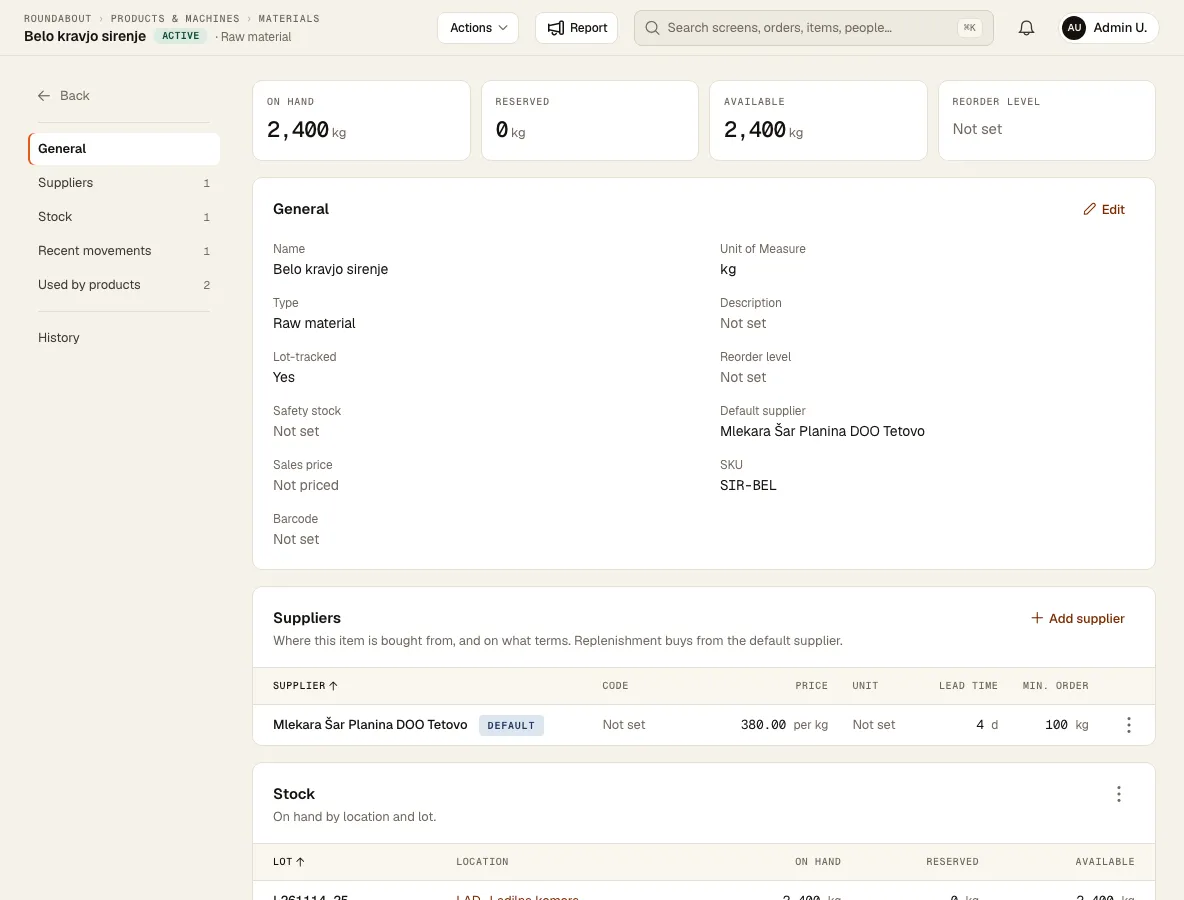
- The strip at the top: what is On hand, Reserved and Available of it, in its unit, and its Reorder level. You see it with the permission
inventory:read. - General: its Name, Unit of Measure, Type, Description, whether it is Lot-tracked, its Reorder level, Safety stock, Default supplier, Sales price, SKU and Barcode. Edit changes them. The unit can’t change once anything counts the material in it, such as an order, a bill of materials or a stock record, and lot tracking can’t change once the material has had a lot.
- Suppliers: who you buy it from and on what terms. See Suppliers.
- Stock: what is on hand, by location and lot, with what is reserved and available. Recent movements lists its latest stock movements.
- Used by products: the products and variants whose bill of materials takes it, with how much of it one unit needs. Replace in BOMs… swaps it there for another material: see Replace it in bills of materials.
- History: who created the material and who changed it last, and when.
Actions holds Generate barcode, while it has no barcode, Duplicate, Archive or Restore, and Delete.
Suppliers
Section titled “Suppliers”Each row is a supplier you buy the material from, with their Code for it, the Price, the purchase Unit, the Lead time in days and the Min. order. One of them is the default, marked Default.
- Add supplier adds one. The first one you add becomes the default; Make default on another row moves it.
- A purchase order line to a supplier starts with their unit, price and code.
- The Replenishment screen orders from the default supplier, no less than its minimum order.
- Planning reads the default supplier’s Lead time (days): for material neither in stock nor on order, an order waits until the start of the day after today plus that many calendar days. With no default supplier, or no lead time, it doesn’t wait for it. See What materials change in planning.
Removing the default supplier leaves the material with no default until you make another one the default.
Replace it in bills of materials
Section titled “Replace it in bills of materials”Replace in BOMs…, under Used by products, swaps this material for another in the bills of materials that use it, and each line keeps its quantity.
- Choose what to Replace with: an active material counted in the same unit.
- Under Replace in, untick a product or a variant you want to leave as it is.
- Click Replace.
werkplan lists each product and variant as replaced or skipped, with the reason. Production orders not yet started follow the change at the next promote; started ones keep this material.
Statuses
Section titled “Statuses”A material is Active when you add it, unless Import materials… gives it another status. Archive makes it Inactive and Restore makes it Active again, from its page, its card or many at once on the Materials screen. Only Edit material, with its Status field, which offers all three, and Import materials… make a material Discontinued.
stateDiagram-v2
  accTitle: Material statuses
  accDescr: A material is added Active, or imported with any status. Archive makes it Inactive and Restore makes it Active. Edit material moves it between any two statuses.
  [*] --> Active: Create material
  [*] --> Inactive: Import materials
  [*] --> Discontinued: Import materials
  Active --> Inactive: Archive, or Edit material
  Inactive --> Active: Restore, or Edit material
  Active --> Discontinued: Edit material
  Inactive --> Discontinued: Edit material
  Discontinued --> Active: Restore, or Edit material
  Discontinued --> Inactive: Edit material
| Status | How a material gets it | How it leaves it | What it changes |
|---|---|---|---|
| Active | Added, restored, or saved with it in Edit material | Archived, or saved with another status | Goes into bills of materials and orders; stock is received |
| Inactive | Archived, imported with it, or saved with it in Edit material | Restored, or saved with another status | Kept where it is used, but added nowhere else; no stock received |
| Discontinued | Imported with it, or saved with it in Edit material | Restored, or saved with another status | The same as Inactive |
Changing a status needs the permission product:write. The list shows Active materials under Active, and Inactive and Discontinued ones under Archived.
Active
Section titled “Active”The material is in use. You can add it to a bill of materials, put it on a quote, a sales order or a purchase order, and receive its stock. The Replenishment screen lists it when it runs low.
Inactive
Section titled “Inactive”The material is archived: kept on record and in every bill of materials that already uses it, but not used anew. werkplan refuses to:
- add it to a product’s bill of materials, or as a variant’s change to one, or choose it to replace another material;
- put it on a quote or a sales order, including an order sent in from another system;
- receive stock of it, or adjust its stock upward. You can still issue it, and write it off.
The material pickers in bills of materials don’t offer it. Production orders that already need it keep needing it, and planning still waits for it as it waits for any material. The Replenishment screen and What runs out next leave it out.
A purchase order line can still name it, but its delivery can’t be received while the material is inactive. Restore it first.
Discontinued
Section titled “Discontinued”The material is out of your range for good. werkplan treats it exactly as Inactive; the status only says so to your team. Archive leaves a discontinued material as it is.
Delete a material
Section titled “Delete a material”In Actions, click Delete and confirm. werkplan deletes a material only if nothing uses it or ever used it: no bill of materials or variant change, price list, quote, sales or purchase order, transfer, production order, stocktake or stock record. When something does, werkplan says what uses it, and for an active material offers Archive instead.
Still stuck? Write to support@example.com.