Tool unit
- Available on
- Trial
- Pro
- Enterprise
- Who can do this
- Open a tool unit's pageRoles: Administrator, Employee
Permission: equipment:read - Change its name, identifier code or status, and add or change its unavailable timeRoles: Administrator
Permission: equipment:write - Delete it, or remove an unavailable timeRoles: Administrator
Permission: equipment:delete
- Open a tool unit's pageRoles: Administrator, Employee
A tool unit is one physical tool of a tool type, such as Die 3 of the type Die set. Its status says whether werkplan plans with it: an Available unit counts, a Decommissioned one doesn’t, and an Unavailable one is out of use for a while.
You open a unit from the Tools screen, from its tool type’s page, or from Show changes on the Master plan screen.
What its page shows
Section titled “What its page shows”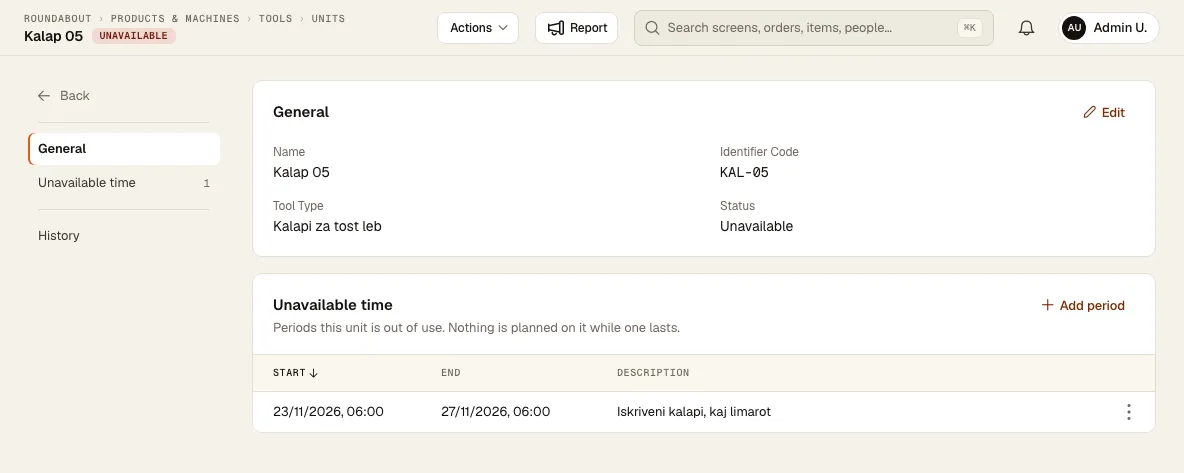
- General: the unit’s Name, Identifier Code, Tool Type and Status. Edit changes the name, the identifier code and the status. A unit’s tool type can’t be changed: to move a tool to another type, add it again under that type and delete this one.
- Unavailable time: the periods the unit is out of use, each with its Start, End and Description. Add period adds one, and every period has an end. While one lasts, the unit’s tool type has one unit fewer.
- History: who created the unit and who changed it last, and when.
Statuses
Section titled “Statuses”You choose between two statuses, Available and Decommissioned. werkplan shows the third, Unavailable, by itself while one of the unit’s unavailable times lasts. It is never saved.
stateDiagram-v2
  accTitle: Tool unit statuses
  accDescr: A unit is created Available or Decommissioned, and Edit tool unit moves it between the two. A unit that is not decommissioned shows Unavailable while one of its unavailable times lasts.
  [*] --> Available: Create tool unit
  [*] --> Decommissioned: Create tool unit
  Available --> Decommissioned: Edit tool unit
  Decommissioned --> Available: Edit tool unit
  Available --> Unavailable: An unavailable time begins
  Unavailable --> Available: It ends, or is moved or removed
  Unavailable --> Decommissioned: Edit tool unit
  Decommissioned --> Unavailable: Edit tool unit during an unavailable time
| Status | How a unit gets it | How it leaves it | In planning |
|---|---|---|---|
| Available | Created with it, as it is by default, or saved with it in Edit tool unit | Saved as Decommissioned, or one of its unavailable times begins | Counts as one unit of its type |
| Unavailable | One of its unavailable times begins, or it is saved as Available during one | That time ends, or is moved or removed, or the unit is saved as Decommissioned | Its type has one unit fewer for that time |
| Decommissioned | Created with it, or saved with it in Edit tool unit | Saved as Available: it is Unavailable if one of its unavailable times lasts then | Left out |
Saving a status needs the permission equipment:write, and so does adding an unavailable time. Removing one needs equipment:delete.
Available
Section titled “Available”The unit can be used. Scenarios and re-plans count it as one unit of its tool type, and plan around its unavailable times. A unit is available when you create it, unless you choose otherwise.
Unavailable
Section titled “Unavailable”The unit is out of use for a while: one of its unavailable times has begun and not ended. werkplan works this status out from the unit’s Unavailable time and never saves it. You can’t choose it in Edit tool unit, where the status keeps showing Available, and the Status filter of the Tools screen finds the unit under Available.
While the time lasts, its tool type has one unit fewer for planning. When the time ends, or you move or remove it, the unit is available again. Add an unavailable time for a repair or planned maintenance, rather than decommissioning the unit.
Decommissioned
Section titled “Decommissioned”The unit stays on record, but werkplan no longer plans with it: scenarios and re-plans made from then on leave it out, with its unavailable time. Save it as Available to plan with it again.
What a change to a tool does to the plan
Section titled “What a change to a tool does to the plan”The master plan never changes by itself. Adding a unit, decommissioning it, bringing it back or deleting it, and adding, moving or removing its unavailable time, are changes the master plan doesn’t hold yet. On the Master plan screen, Show changes lists them under Tools:
| Change | Listed as |
|---|---|
| A unit added as Available, or saved as Available again | New tool · … with its tool type |
| A unit saved as Decommissioned | Taken out of service |
| A unit that isn’t decommissioned deleted | Deleted |
| An unavailable time added | Unavailable … with its time |
| An unavailable time moved | Unavailable … with its old time, then → and its changed time |
| An unavailable time removed | No longer unavailable … with its time |
A unit added as Decommissioned isn’t listed, and neither is a decommissioned unit deleted. Renaming a unit, changing its identifier code or changing the description of an unavailable time changes nothing that is planned, and isn’t listed.
A scenario made before the change goes out of date: unless something else put it out of date first, it reads Out of date · planning data changed since it was made. A re-plan that takes the change in is solved in full. When the change to a tool is what makes it full, it says Full re-plan: the change to tool … needs it, with the unit’s name.
Still stuck? Write to support@example.com.