Overtime authorisations
- Available on
- Trial
- Pro
- Enterprise
- Who can do this
- Open this screenRoles: Administrator, Shift supervisor, Employee
Permission: schedule:read - Authorise a period, or revoke an authorisationRoles: Administrator
Permission: overtime:authorise
- Open this screenRoles: Administrator, Shift supervisor, Employee
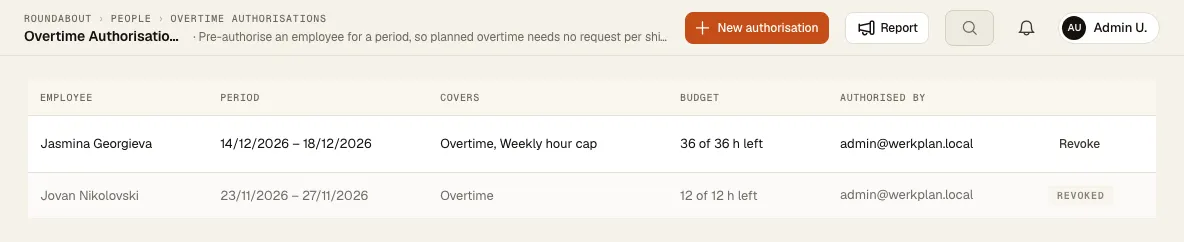
The Overtime authorisations screen lists the overtime authorisations: someone with overtime:authorise lets one employee’s shifts in a period pass the working-time limits they chose, up to an hour budget. A shift it covers needs no overtime request of its own.
Use it for overtime you can see coming, such as the weeks before a holiday. Without one, every shift past a limit waits for a request to be decided.
The list
Section titled “The list”| Column | What it shows |
|---|---|
| Employee | Whose shifts it lets through |
| Period | The first and the last day, both included |
| Covers | The limits a shift may pass |
| Budget | The hours left of its budget, such as 24 of 36 h left, or No cap |
| Authorised by | The login of whoever authorised it |
Revoke stands beside each one for someone with overtime:authorise. A revoked authorisation reads Revoked and is dimmed.
Authorise a period
Section titled “Authorise a period”- Click New authorisation.
- Choose the Employee, and the period, From its first day To its last.
- Under Limits this covers, tick each limit the shifts may pass. Only the limits an authoriser can permit are offered: a floor isn’t. A shift passes only when every limit it breaks is ticked.
- Enter an Hour budget, or leave it empty for no cap.
- Say why in Reason. An anonymised employee’s authorisation takes no reason.
- Click Authorise.
When no limit can be authorised, as your labour rules set them, Authorise stays off. werkplan refuses a period that ends before it starts.
How a shift uses it
Section titled “How a shift uses it”When a shift you place breaks working-time limits, werkplan first raises each limit by the employee’s live consents. If the shift still breaks one, it looks for an authorisation of the employee whose period holds the shift’s day and that isn’t revoked:
- it covers every limit the shift breaks: one limit left out is no cover;
- its budget has room: the shift’s whole working hours, added to those of the shifts it already let through, fit the Hour budget. Shifts that pass without it don’t count.
Then the shift is placed, marked on the schedule as authorised overtime. When the budget is spent, or a limit isn’t covered, werkplan asks for an overtime request instead. A floor is never passed: see Floors and authorisable limits.
It counts for every shift you place by hand: Set shift, filling a coverage gap, Assign on an understaffed shift, and each side of a swap. It lets an absence through too, when the shifts it leaves would break a limit it covers. The workforce solve never uses it: Plan workforce plans within every limit.
Authorisations from the re-plan
Section titled “Authorisations from the re-plan”Promoting the open re-plan saves an authorisation for each extra or longer shift whose fix needed one and had Authorise ticked: the shift’s day as its period, the limits it breaks, and the shift’s working hours as its budget, in the name of whoever ticked it. They are listed here with the others. See Call someone in for an extra shift.
Revoke an authorisation
Section titled “Revoke an authorisation”Click Revoke and confirm. From the day it is revoked, by the date in UTC, the employee’s overtime needs a request per shift again. The authorisation stays on the list: shifts placed under it before then stay as they are.
Still stuck? Write to support@example.com.