Stocktake
- Available on
- Trial
- Pro
- Enterprise
- Who can do this
- Open a stocktake's page and print its count sheetRoles: Administrator, Employee
Permission: inventory:read - Plan a stocktake, count, finish, reopen, complete or cancel itRoles: Administrator
Permission: inventory:write
- Open a stocktake's page and print its count sheetRoles: Administrator, Employee
A stocktake counts what is physically on your shelves and compares it with what werkplan’s books hold. When you complete it, werkplan posts every difference as one stock adjustment, so the books match the shelves.
You open a stocktake from the Stocktakes screen. Its number reads ST- and a running number, such as ST-0000001.
Its scope
Section titled “Its scope”A stocktake counts one of three scopes, chosen when you plan it:
- Full count: every one of your own locations; contractors’ premises are left out.
- One location: the location you choose, a contractor’s too.
- Cycle count: the items you choose when you start it, wherever your own locations hold stock of them.
Only one open Full count or One location count may cover a location: werkplan refuses to plan a second, naming the count that covers it. A Full count covers every location, so it can’t be open beside another full or one-location count. Cycle counts can be open side by side. Whatever the scope, Start counting is refused when another count being counted, or awaiting review, already counts one of the same items at one of the same locations: each would correct the same shelf.
What its page shows
Section titled “What its page shows”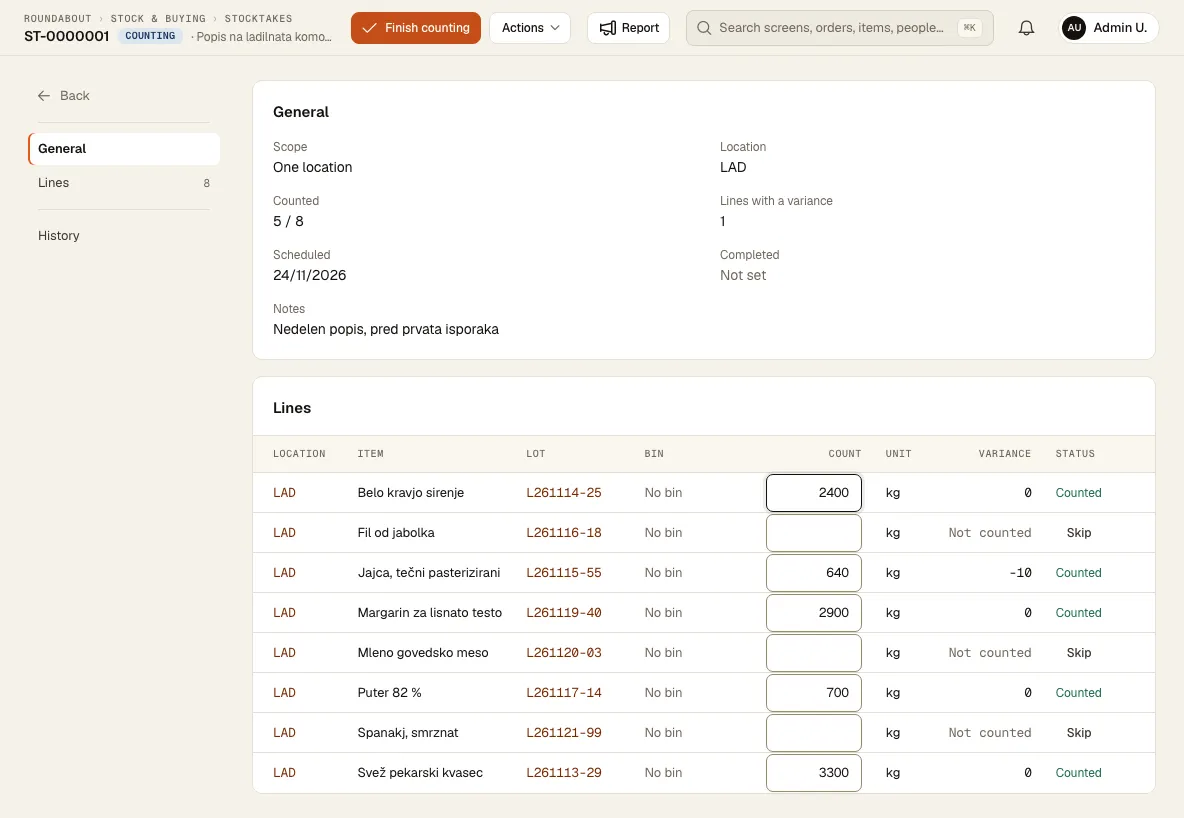
- The top bar: its number, its name, its status and its next step: Start counting, Finish counting or Complete and post.
- General: its Scope, Location (Every location for a full or cycle count), how many lines are Counted, skipped ones included, the Lines with a variance, the day it is Scheduled, when it was Completed, and its Notes.
- Lines, once counting has started: each line’s Location, Item, Lot, Bin, the Count, its Unit, the Variance from the books once counted, and its Status: Counted, Skipped, Saving… or Not saved, or Skip on a line not counted yet.
- History: who created it and who changed it last, and when.
Actions holds Reopen counting while it awaits review, Print count sheet once it has lines, and Cancel count until it is completed or cancelled.
While it is Counting or Awaiting review, each line has a count box:
- Type what you found and press Enter or move to the next box. Each count saves on its own, in turn. A count left blank is not zero.
- For an item numbered by serial number, list the units you found, separated by commas; None found records an empty shelf, after you confirm.
- Skip sets a line aside on purpose: it is left out of the count and posts nothing.
Print count sheet opens a PDF of where to count, ordered by location, with a blank for each figure and no quantity from the books, so the shelf is counted rather than checked against a number.
Stock keeps moving while you count: receipts, issues and deliveries go on as usual. Each count is measured against what the books hold at the moment you enter it, so a delivery booked before you reached the shelf is in both your count and the books and posts nothing.
Statuses
Section titled “Statuses”You move a stocktake through each status yourself.
stateDiagram-v2
  accTitle: Stocktake statuses
  accDescr: A stocktake starts as a Draft. Start counting freezes its lines and makes it Counting. Finish counting makes it Awaiting review, and Reopen counting takes it back. Complete and post posts the differences and makes it Completed. Cancel count cancels it from any of the first three.
  state "Awaiting review" as Review
  [*] --> Draft: Planned
  Draft --> Counting: Start counting
  Counting --> Review: Finish counting
  Review --> Counting: Reopen counting
  Review --> Completed: Complete and post
  Draft --> Cancelled: Cancel count
  Counting --> Cancelled: Cancel count
  Review --> Cancelled: Cancel count
| Status | How a stocktake gets it | How it leaves it | What it does to stock |
|---|---|---|---|
| Draft | New stocktake | Start counting, or Cancel count | Nothing |
| Counting | Start counting, or Reopen counting | Finish counting once every line is counted or skipped, or Cancel count | Nothing; stock keeps moving |
| Awaiting review | Finish counting | Complete and post, Reopen counting, or Cancel count | Nothing |
| Completed | Complete and post | It stays completed | One adjustment for every line that differs from the books |
| Cancelled | Cancel count | It stays cancelled | Nothing |
Every status change and every count needs the permission inventory:write.
The stocktake is planned: it has a scope, a name and a day it is Scheduled, which is for your planning only, but no lines. Start counting freezes its lines: one for each place your stock records hold an item in its scope, by location, lot and bin, expecting what the books hold at that moment. A cycle count first asks for its Items to count. werkplan refuses to start a count whose scope has no stock records at all; a place that held stock once and holds none becomes a line expecting zero.
Counting
Section titled “Counting”The lines are fixed: no line can be added. You enter counts, list units and skip lines. Finish counting is refused while a line is neither counted nor skipped, and held while a count is still saving or failed to save.
Awaiting review
Section titled “Awaiting review”Counting is declared finished, and the variances are settled: each line shows how far its count is from the books. Counts can still be corrected. Reopen counting goes back to counting, for the aisle somebody missed; nothing has been posted. Complete and post asks you to confirm, and is held while a count is saving or failed to save.
Completed
Section titled “Completed”werkplan posted one adjustment, named after the stocktake, with a correction for every counted line that differs from the books, each into its line’s bin: stock found is added, stock missing is written off. A unit numbered by serial number that nobody found is written off, and one found that the books lacked is added. When a write-off takes a balance below what is reserved for production orders, those reservations are released, oldest first.
When every count agreed, nothing is posted, and the page says the count agreed with the system. A stocktake’s adjustment can’t be voided: to correct a count, count again.
Cancelled
Section titled “Cancelled”The count is abandoned, and nothing it found is posted. The stocktake stays in the list as cancelled, and is never deleted.
What a stocktake changes in planning
Section titled “What a stocktake changes in planning”A completed stocktake changes stock on hand, which the next scenario or re-plan plans with: stock found can cover material a production order was waiting for, and stock written off can make one wait. The master plan doesn’t change by itself.
Still stuck? Write to support@example.com.