Swap request
- Available on
- Trial
- Pro
- Enterprise
- Who can do this
- See a swap requestRoles: Administrator, Shift supervisor, Employee
Permission: schedule:read - Ask for a swap, or withdraw oneRoles: Administrator, Shift supervisor
Permission: schedule:write - With schedule:write, approve or reject a swapRoles: Administrator
Permission: swap:approve - With schedule:write and swap:approve, approve a swap you asked for yourselfRoles: Administrator
Permission: workforce:admin
- See a swap requestRoles: Administrator, Shift supervisor, Employee
A swap request asks for two employees to exchange their shifts of one day: each would work the other’s shift. Nothing changes on the workforce schedule until someone who decides swaps approves it.
You ask for a swap on the Schedule screen, and decide it on the Swap requests screen.
What it shows
Section titled “What it shows”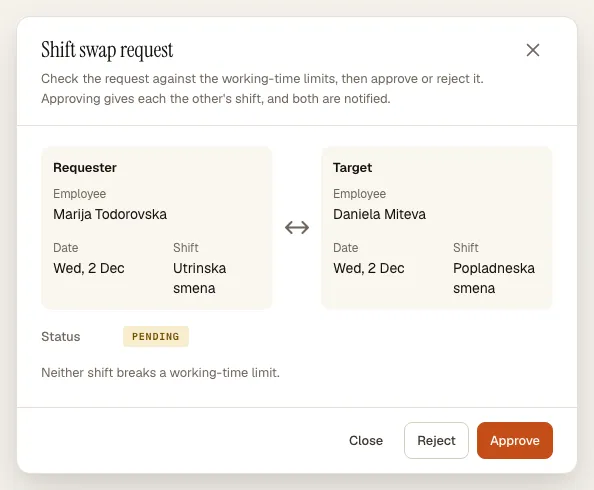
- Requester: the employee who gives their shift away, with the Date and the Shift they work.
- Target: the employee who would take it, with the same day and the shift they work.
- Status: where the request stands (below).
- What werkplan found when the swap was asked for: whether either shift breaks a working-time limit for the one who would take it, and whether one falls outside that employee’s shift group. It doesn’t change after that: Approve checks again.
A swap exchanges two shifts of one day. Request a shift swap offers only the employees on another shift that day, and werkplan refuses a swap between two days.
Statuses
Section titled “Statuses”stateDiagram-v2 accTitle: Swap request statuses accDescr: A swap request is Pending once asked for. Approve makes it Approved and exchanges the two shifts. Reject makes it Rejected, and Withdraw request makes it Cancelled. None of the three changes again. [*] --> Pending: Request swap Pending --> Approved: Approve Pending --> Rejected: Reject Pending --> Cancelled: Withdraw request Approved --> [*] Rejected --> [*] Cancelled --> [*]
| Status | How a request gets it | How it leaves it | Who moves it | What it changes elsewhere |
|---|---|---|---|---|
| Pending | Request swap in Request a shift swap | Approved, rejected or withdrawn | Someone with schedule:write asks |
Everyone with swap:approve is notified; the schedule stays as it is |
| Approved | Approve | It doesn’t | Someone with schedule:write and swap:approve |
The two employees exchange their shifts; their user accounts are told |
| Rejected | Reject | It doesn’t | Someone with schedule:write and swap:approve |
Nothing on the schedule; their user accounts are told |
| Cancelled | Withdraw request | It doesn’t | Someone with schedule:write |
Nothing; nobody is told |
Pending
Section titled “Pending”The swap waits for a decision. werkplan saves the request when both employees work a shift that day, and records what it found against the working-time rules and the shift groups. Everyone with swap:approve is notified, with New swap request and the two names.
The schedule doesn’t change, and production doesn’t read the request. A pending request has no end of its own: it waits until someone decides or withdraws it, and deactivating one of the employees leaves it pending.
Approved
Section titled “Approved”The two employees exchange their shifts. Approve checks everything again, as the schedule stands then:
- both employees still work a shift that day, and both are active;
- each shift, as the other employee would take it, passes every check a shift you set by hand passes: their shift group that day, their absences, no overlap with another of their shifts, and the working-time rules;
- a working-time limit it breaks passes on an overtime authorisation that covers it, or an approved overtime request for that shift. Any other limit refuses the swap, and werkplan names each one; when the request broke none as it was asked for, it adds that the schedule changed after the request.
Someone who asked for the swap can’t approve it, though they hold swap:approve, unless they hold workforce:admin too: werkplan says You requested this swap. They may reject it.
Then each employee takes the other’s shift type that day, with the training seat that goes with it. Where the shift each one leaves falls short of its coverage goals, werkplan records a coverage gap, and the shift each one takes cancels the open gaps it fills. No reason is asked, even inside your notice period: an agreed swap needs no notice.
A swap of a published shift, from today on, is a change the master plan doesn’t hold yet, which the next re-plan takes in. The user accounts linked to the two employees are told, Your swap request was approved, or everyone with swap:approve when neither has one; whoever approved it isn’t.
Rejected
Section titled “Rejected”Someone who decides swaps turned it down. Reject checks nothing and changes nothing on the schedule. The two employees’ user accounts are told, Your swap request was rejected, as for an approval.
Cancelled
Section titled “Cancelled”Whoever asked, or anyone with schedule:write, withdrew the request with Withdraw request before it was decided. Nothing changes and nobody is notified.
Still stuck? Write to support@example.com.