Product
- Available on
- Trialup to 50 products
- Proup to 500 products
- Enterprise
- Who can do this
- Open a product's pageRoles: Administrator, Employee
Permission: product:read - Change it, its bill of materials, routings, steps, attributes and variants, and archive, restore or duplicate itRoles: Administrator
Permission: product:write - Delete it, or remove a line, a routing, a step, a tool requirement, an additional employee or an attributeRoles: Administrator
Permission: product:delete - See the machines that can run itRoles: Administrator, Employee
Permission: equipment:read
- Open a product's pageRoles: Administrator, Employee
A product is something you make, such as Rye bread, with its variants, its bill of materials and its routings. Its status says whether you still add to it, and its routing’s status says whether its production orders are planned: only an Active routing is.
You open a product from the Products screen.
What its page shows
Section titled “What its page shows”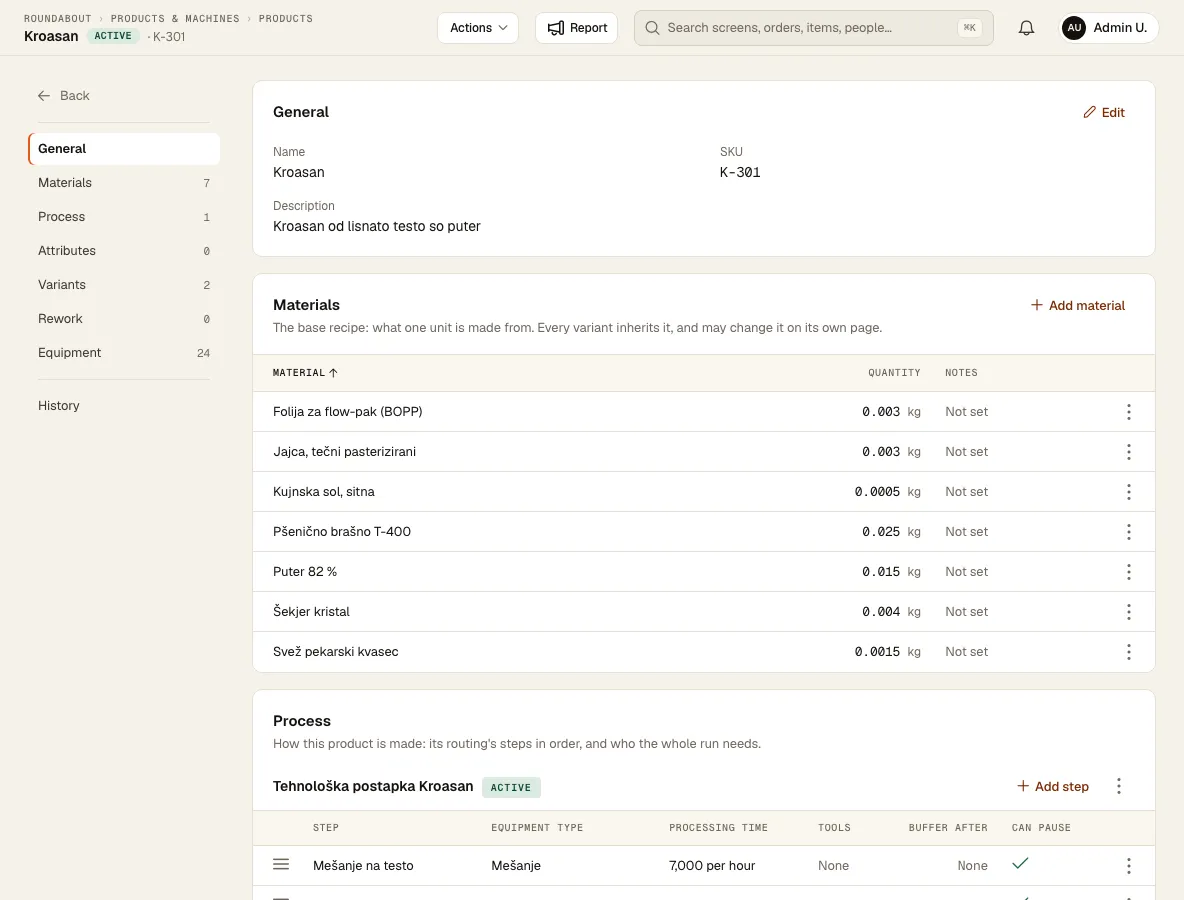
- General: its Name, SKU and Description. Edit changes them and its status.
- Materials: its bill of materials, the base recipe every variant inherits. See Materials: the bill of materials.
- Process: its production routing, the steps every production order of it is made in. See Process: the routing.
- Attributes: the measures its variants give a value for, such as weight. See Attributes.
- Variants: what you sell and order of it, archived ones included. Click one to open it: see Variant.
- Rework: its rework routings, for parts a QA rejection turns back.
- Equipment: the machines that can run its steps, with the capacity figures werkplan plans with and where each comes from: the Product, or the machine’s Equipment default. It lists them only while the production routing is active, and you see it with the permission
equipment:read. - History: who created the product and who changed it last, and when.
Actions holds Duplicate, Archive or Restore, and Delete. Duplicate copies the product with its bill of materials, attributes and routings, and opens the copy; it copies no variants, and the copy counts toward your tier’s cap.
Materials: the bill of materials
Section titled “Materials: the bill of materials”Materials lists what one unit of the product is made from: each Material, its Quantity per unit in the material’s unit, and Notes. Every variant inherits it, and a variant may add, override or remove a line on its own page.
Add material adds a line: an active material that isn’t in the list yet, and the quantity one unit uses. Edit changes a line’s quantity or notes, and Remove takes it out. werkplan refuses a line that would make a bill of materials contain itself, directly or through another product.
Production orders made after a change record the changed bill of materials. Orders not started yet follow it at the next promote; started ones keep what they recorded. For each order, werkplan works out from it what material it needs and when that material is there: see What materials change in planning. How to set one up step by step: Set up a bill of materials.
Process: the routing
Section titled “Process: the routing”Process shows the product’s production routing: its name, its status and its steps in order. A product has one production routing, and its production orders are planned along it only while it is Active. While it isn’t, the panel says that orders for the product are not planned.
Each step shows its Step name, its Equipment type, its Processing time, its Tools, its Buffer after and whether it Can pause after. Drag a step to change the order. Add step adds one, and each step’s row offers Tool requirements, Edit and Remove. Under the steps, Additional employees lists the trainings every step of the routing needs on top of its machine’s crew.
How to set one up step by step, with what each field does in planning: Give a product its routing.
Rework holds the product’s rework routings: steps of their own, such as stripping and re-coating, that a part a QA rejection turns back runs along before it rejoins the production routing. A product has any number of them, each with a name no other has. Add rework routing adds one; it is offered on a QA rejection once it is Active.
Attributes
Section titled “Attributes”An attribute is a measure the product’s variants each give a value for, per unit, such as weight in g or volume in mL. A product has at most one attribute per dimension. With one, a machine’s capacity can count batches and rates in kg or litres, and werkplan converts them to each variant’s units through its value. Add attribute adds one, with its Unit and its Display order. Once a variant gives a value in it, its unit can’t change.
Statuses
Section titled “Statuses”A product is Active when you add it, unless you choose another Status in New product. Archive makes it Inactive and Restore makes it Active again, from its page, its card, or many at once. Only the Status field of New product and Edit product, which offers all three, and Import products… make a product Discontinued.
stateDiagram-v2
  accTitle: Product statuses
  accDescr: A product is added Active, or with the status chosen for it. Archive makes it Inactive and Restore makes it Active. Edit product moves it between any two statuses.
  [*] --> Active: Create product
  [*] --> Inactive: Create product
  [*] --> Discontinued: Create product
  Active --> Inactive: Archive, or Edit product
  Inactive --> Active: Restore, or Edit product
  Active --> Discontinued: Edit product
  Inactive --> Discontinued: Edit product
  Discontinued --> Active: Restore, or Edit product
  Discontinued --> Inactive: Edit product
| Status | How a product gets it | How it leaves it | What it changes |
|---|---|---|---|
| Active | Added with it, as it is by default, restored, or saved with it in Edit product | Archived, or saved with another status | Its variants can be added and changed; machines can be given a capacity for it |
| Inactive | Added with it, archived, or saved with it in Edit product | Restored, or saved with another status | No variant added or changed; still planned, and its active variants still sold |
| Discontinued | Added with it, or saved with it in Edit product | Restored, or saved with another status | The same as Inactive |
Changing a status needs the permission product:write. A product’s status doesn’t change its variants’ statuses, and planning doesn’t read it.
Active
Section titled “Active”The product is in use. You can add variants to it and change them, and give a machine a capacity or a changeover for it.
Inactive
Section titled “Inactive”The product is archived. werkplan keeps it with its routings, its bill of materials and its variants, and:
- refuses to add a variant to it, or to change one of its variants or that variant’s bill of materials changes and step changes; archiving and restoring a variant still work. The product’s own bill of materials and routings can still be changed;
- leaves it out of the products offered for a machine’s capacity or changeover.
Its variants keep their own statuses: an active variant of an archived product can still be quoted, sold and made, and its open production orders are still planned. To stop selling it, archive its variants too.
Discontinued
Section titled “Discontinued”The product is out of your range for good. werkplan treats it exactly as Inactive; the status only says so to your team. Archive leaves a discontinued product as it is.
Routing statuses
Section titled “Routing statuses”A routing you add on this page starts as Draft. Edit routing, in the menu beside its name, changes its Status to any of the three. A routing that Import routings… creates is Active at once.
stateDiagram-v2
  accTitle: Routing statuses
  accDescr: A routing added on the product's page starts Draft; one an import creates starts Active. Edit routing moves it between any two of Draft, Active and Deprecated.
  [*] --> Draft: Create routing
  [*] --> Active: Import routings
  Draft --> Active: Edit routing
  Active --> Draft: Edit routing
  Active --> Deprecated: Edit routing
  Deprecated --> Active: Edit routing
  Draft --> Deprecated: Edit routing
  Deprecated --> Draft: Edit routing
| Status | How a routing gets it | How it leaves it | In planning |
|---|---|---|---|
| Draft | Added on the product’s page, or saved with it | Saved with another status | Not planned: the product’s orders are left out |
| Active | Saved with it, or created by an import | Saved with another status | Its steps plan every production order of the product |
| Deprecated | Saved with it | Saved with another status | Not planned, as Draft |
Changing a status needs the permission product:write.
The routing is being set up. Scenarios and re-plans leave every production order of the product out, with the reason No active routing, and the order is listed with the orders that couldn’t be planned. A rework routing in draft isn’t offered on a QA rejection.
Active
Section titled “Active”The routing is in use. Scenarios and re-plans plan each production order of the product along its steps, on the machines of each step’s equipment type. A rework routing that is active is offered on a QA rejection.
Deprecated
Section titled “Deprecated”The routing is out of use but kept, for the record. It is planned no more than a draft. A rework routing that a QA rejection reworks along can’t be deleted: deprecate it instead, so it is no longer offered. A rejection that already chose it keeps its rework.
What a change to a product does to the plan
Section titled “What a change to a product does to the plan”The master plan never changes by itself. A change to the active production routing of a product that open orders make, such as making it active or taking it out of use, adding, removing or changing a step, a tool requirement or an additional employee, or a variant’s step change, is a change the master plan doesn’t hold yet. On the Master plan screen, Show changes lists it under Routings, with the product’s name, or the variant’s for a step change:
| Change | Listed as |
|---|---|
| The routing made active | New routing |
| The routing taken out of use, or deleted | No longer active, or Deleted |
| A step added or removed | Step … added with its equipment type, or Step … removed |
| A step changed | Step … with what changed, such as Buffer after, old → changed |
| A tool requirement added or removed | Step … needs the number and the tool type, or Step … no longer needs it |
| An additional employee added or removed | Needs … trained for …, or No longer needs anyone trained for … |
| A variant’s step change added or taken back | add first step …, add last step … or override step …, or Step … no longer changed |
Renaming a product, a routing or a step, changing its SKU, status or description, changes to a rework routing or to a routing that isn’t active, and changes to attributes aren’t listed. A change to a bill of materials isn’t listed as such: it shows only when it moves an order’s material-ready time, under Production orders as Material ready.
A scenario made before a listed change goes out of date: it reads Out of date · planning data changed since it was made. A re-plan that takes a routing change in is solved in full, and says Full re-plan: the change to …’s routing needs it, with the product’s name, or the variant’s.
Delete a product, a routing or a step
Section titled “Delete a product, a routing or a step”- A product: werkplan doesn’t delete a product that has variants, archived ones included. For an active product it offers Archive instead.
- A routing: Delete routing, in the menu beside its name. werkplan doesn’t delete a routing whose steps a variant changes: remove those changes first. Nor one a QA rejection reworks along: deprecate it instead.
- A step: Remove on its row. werkplan doesn’t remove a step the shop floor has recorded work on. The steps after it move up.
Still stuck? Write to support@example.com.