API keys
- Available on
- Trial
- Pro
- Enterprise
- Who can do this
- Open this screenRoles: Administrator
Permission: organization:write - Make or revoke an API keyRoles: Administrator
Permission: organization:write
- Open this screenRoles: Administrator
The API keys screen lists the keys your source systems, such as a webshop or an EDI bridge, send sales orders to werkplan with. Here you make a key for a system, and revoke one you no longer trust.
A key does one thing: it lets a system send sales orders through the sales-order intake API, into your organisation. It can’t read anything or change anything else. A key doesn’t expire: it stops working when you revoke it, and while your organisation is disabled or its subscription has ended.
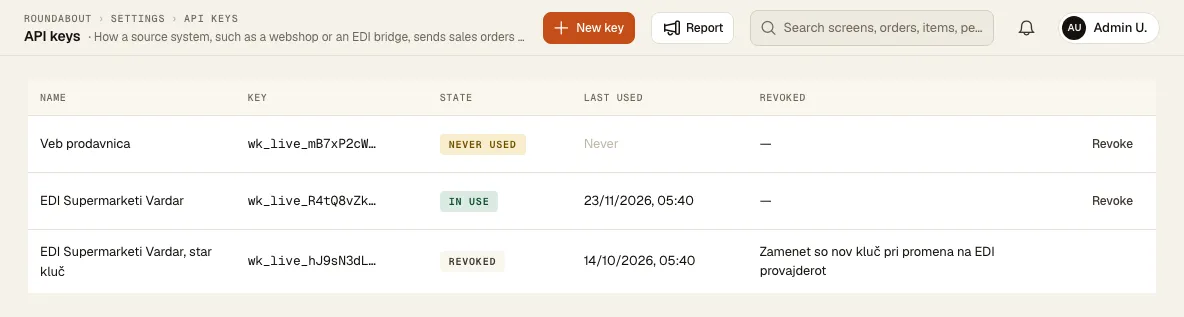
The list
Section titled “The list”Each key shows:
- Name: the system it is for, as you named it.
- Key: the first characters of the key, enough to recognise it. werkplan doesn’t keep the rest, so it can’t show the key again.
- State: In use once werkplan has taken a request with the key, Never used before that, and Revoked once you revoke it.
- Last used: when werkplan last took a request with it, to within a minute, or Never.
- Revoked: why it was revoked.
Keys that work come first, the latest first, then the revoked ones.
Make a key
Section titled “Make a key”- Click New key.
- Enter a Name: the system that uses the key, such as Shopify store. Two keys may have the same name, but a clear name tells you later which system you stop when you revoke it.
- Click Create key.
- Copy the key that appears and put it into the sending system. It is shown only this once: if you lose it, make another key and revoke this one.
- Click Done.
Make one key for each system, so you can stop one without stopping the others.
Revoke a key
Section titled “Revoke a key”Revoke a key when it has leaked, or when the system that used it is retired or has a key of its own.
- On the key’s row, click Revoke.
- Enter the Reason, such as leaked or system retired. The list shows it under Revoked.
- Click Revoke.
Anything still sending with the key is refused at once. The sales orders it sent stay as they are. Revoking can’t be undone: to let the system send again, make it another key.
Still stuck? Write to support@example.com.